The journal: your mood at a glance
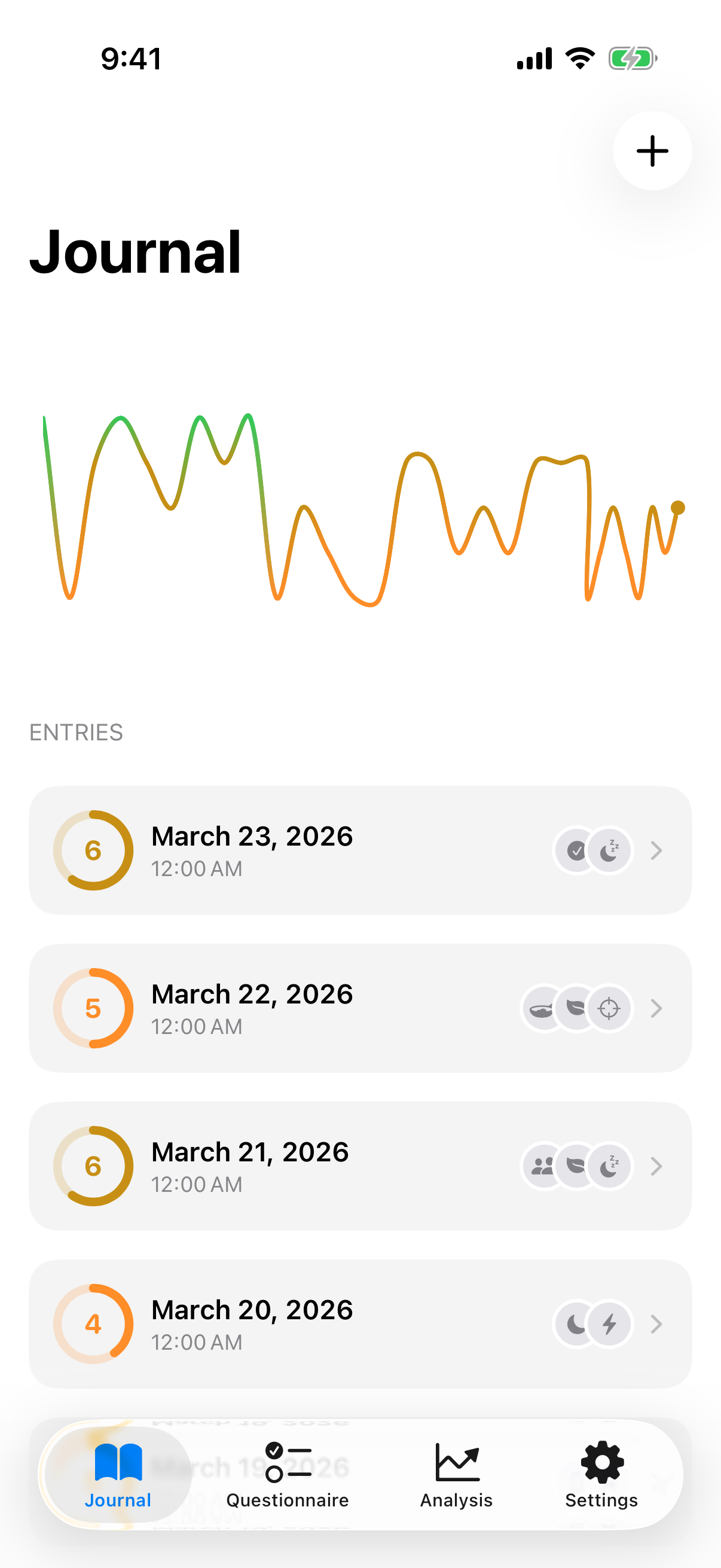
When you open InnerPulse, you land in the journal. Here you see all your entries sorted chronologically, with color-coded mood score rings and the day's factor icons.
At the top, a trend chart shows your mood over the last 30 entries. You can choose between three display styles: line (smooth curve), bars (individual daily values), or color (intuitive red-to-green gradient).
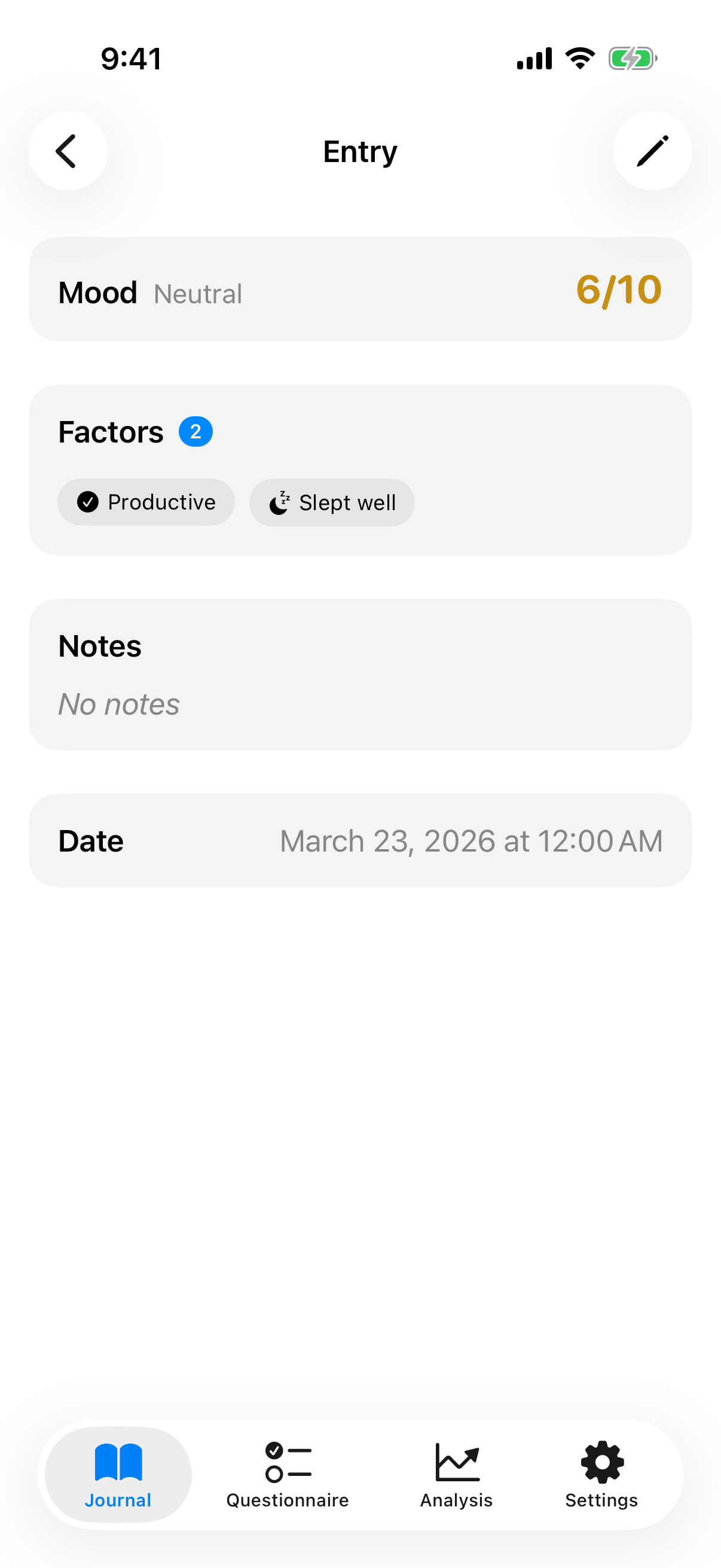
Tap an entry to see the details. Each entry shows your mood score (e.g., 6/10, "Neutral"), the selected factors (e.g., "Productive" and "Slept well"), your optional notes, and the date. The pencil icon lets you edit any entry after the fact.
Swipe left to delete. If you delete by accident, shake your iPhone to restore the entry.
The four tabs at the bottom guide you through the app: Journal, Questionnaire, Analysis, and Settings.
Your daily check-in: capture your mood in 10 seconds
At its core, InnerPulse is built around a simple daily check-in. Tap the + icon in the top right of the journal:
- Rate your mood: Slide the dial on a scale from 1 to 10. The color gradient goes from red (low) to green (high).
- Select factors: Choose what influenced your day. InnerPulse suggests factors contextually, based on time of day, weekday, and your habits.
- Add a note (optional): Write a short text. InnerPulse offers writing prompts that match your current mood.
Important: There's no streak pressure. No reward system, no badges, no guilt for missing a day. Every single entry has value on its own.
82 influence factors: understand what shapes your mood
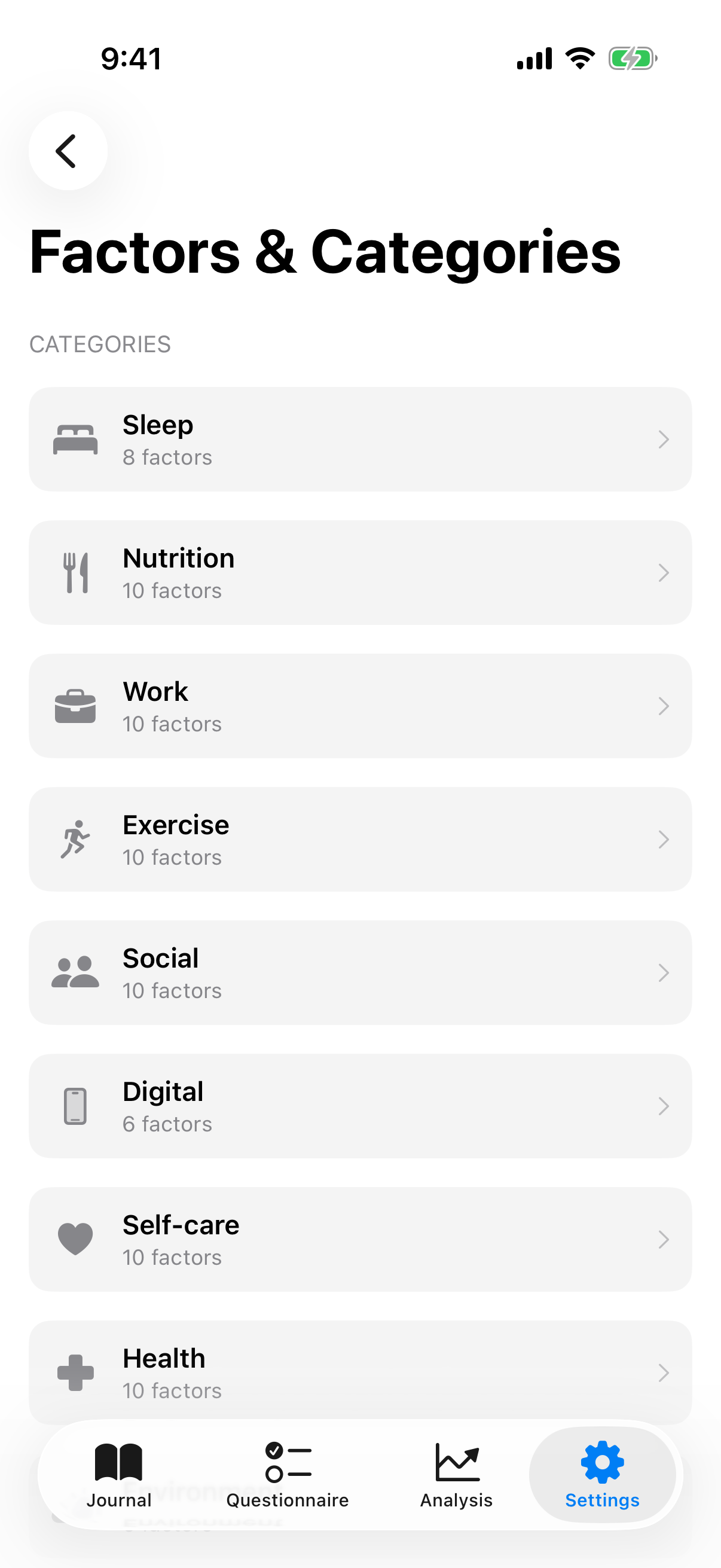
InnerPulse comes with 82 pre-defined influence factors across 10 categories:
- Sleep (8 factors): Sleep quality, duration, timing, continuity
- Nutrition (10 factors): Healthy eating, hydration, caffeine, alcohol
- Work (10 factors): Productivity, focus, work-life balance, meetings
- Exercise (10 factors): Workouts, walks, outdoor time, sedentary time
- Social (10 factors): Friends, conversations, conflicts, romance
- Digital (6 factors): Screen time, doomscrolling, social media
- Self-care (10 factors): Rest, hobbies, meditation, journaling
- Health (10 factors): Pain, medication, energy, illness
- Environment (6 factors): Weather, noise, organization, travel
- Finance (4 factors): Savings, expenses, income, money stress
You can create custom factors and categories at any time. If a pre-defined factor doesn't fit, simply hide it.
What makes it special: InnerPulse learns your behavior. Factors you use regularly are automatically suggested based on time of day, weekday, and your past patterns. If you often select "Deadline stress" on Mondays, that factor appears higher on Mondays.
Many factors come in opposite pairs: "Slept well" and "Slept badly" are linked. If you dismiss one, InnerPulse suggests the other.
Clinical questionnaires: science in your pocket
InnerPulse includes 4 clinical screening instruments used in psychological practice worldwide:
- PHQ-9 (Patient Health Questionnaire-9): Depression, 9 items, score 0 to 27
- GAD-7 (Generalized Anxiety Disorder-7): Anxiety, 7 items, score 0 to 21
- PHQ-4: Brief screening (2 depression + 2 anxiety items), score 0 to 12
- K10 (Kessler-10): Psychological distress, 10 items, score 10 to 50
You can complete each questionnaire directly in the app or enter a score manually if you've taken the test elsewhere.
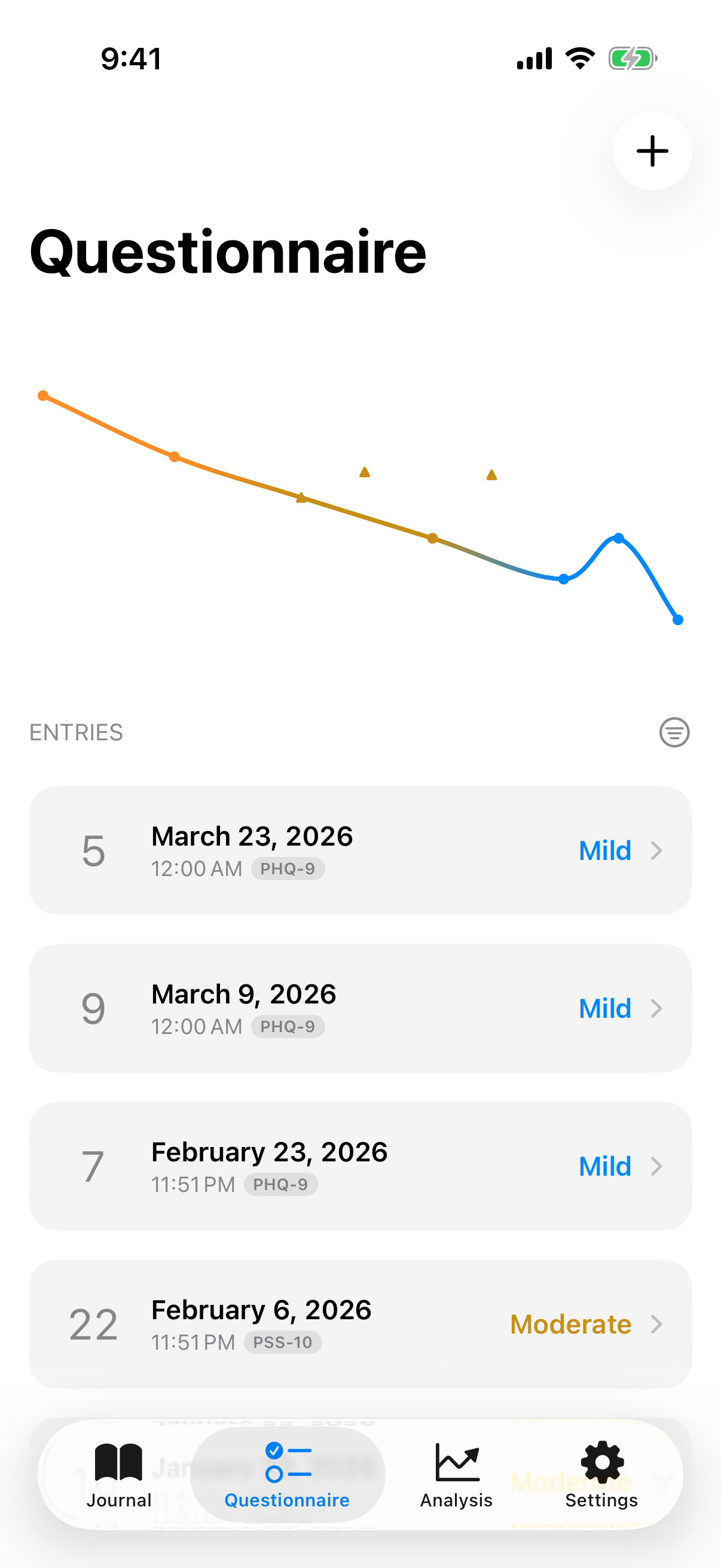
The Questionnaire tab shows all your results with a trend chart. Each question appears one at a time with a progress bar. At the end, you get your score with a severity classification (e.g., "Mild") and a comparison to your previous result.
The PHQ-9 also uses a diagnostic algorithm based on DSM criteria: the app checks whether your answer patterns indicate a depressive syndrome.
Crisis detection: three tiers of safety
InnerPulse evaluates questionnaire results with a 3-tier system:
-
Notice (blue): Subtle hint for notable but non-critical scores. For example, PHQ-9 between 10 and 14.
-
Urgent (orange): Warning for repeatedly elevated scores. For example, PHQ-9 of 15 or above on two tests within 6 weeks. The app recommends contacting a professional.
-
Acute (red, full-screen): When indicators suggest an acute crisis, InnerPulse shows a crisis screen with emergency hotline numbers for Germany, Austria, and Switzerland.
Insights: spot patterns you'd otherwise miss
The Insights tab is InnerPulse's analytical core. This is where your daily entries transform into meaningful patterns.
MoodRing and trend
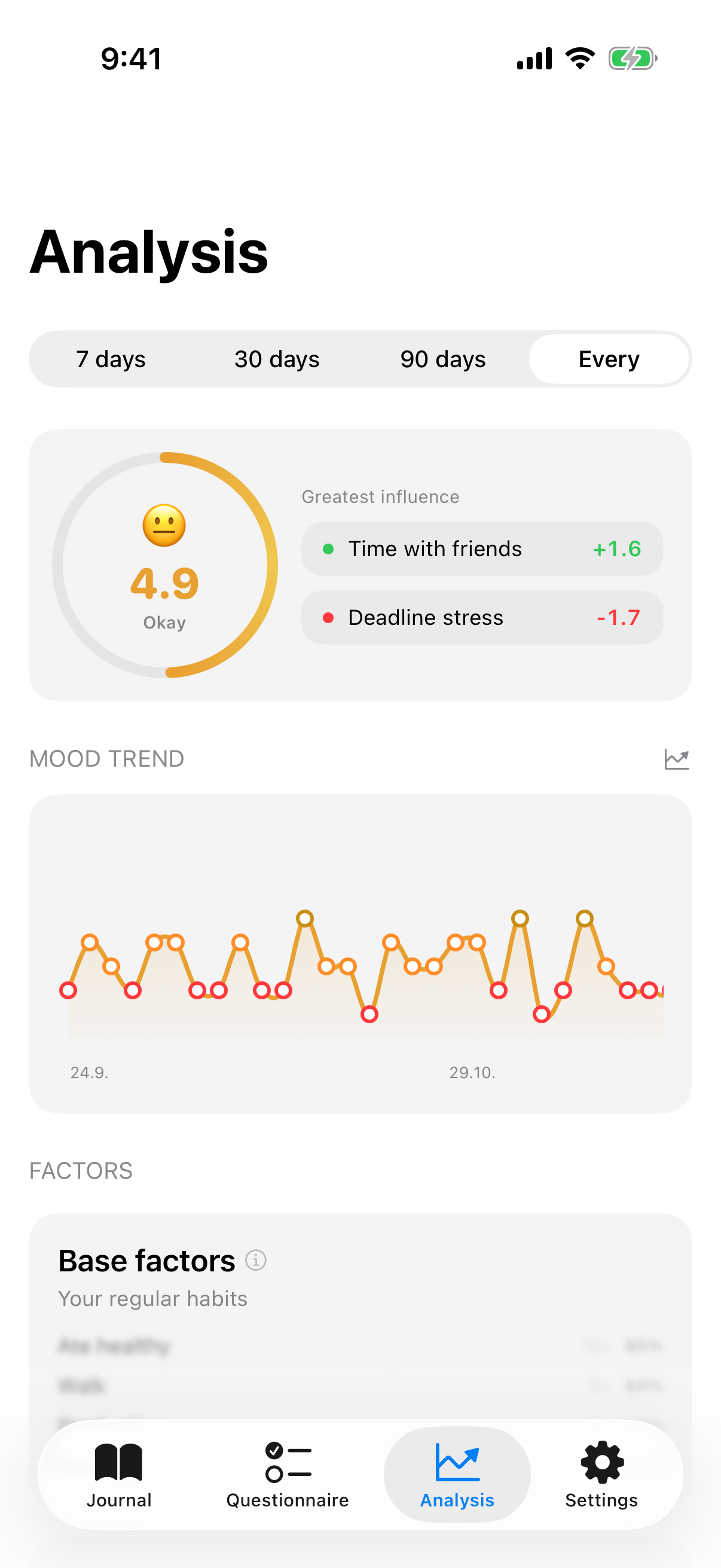
At the top, the MoodRing: an animated circle with your average over the selected time range, an emoji, and the two factors with the greatest positive and negative influence. Switch between 7 days, 30 days, 90 days, or All.
Below that, the mood sparkline with a regression line showing whether your mood is rising or falling long-term.
Factor analysis: base vs. impact
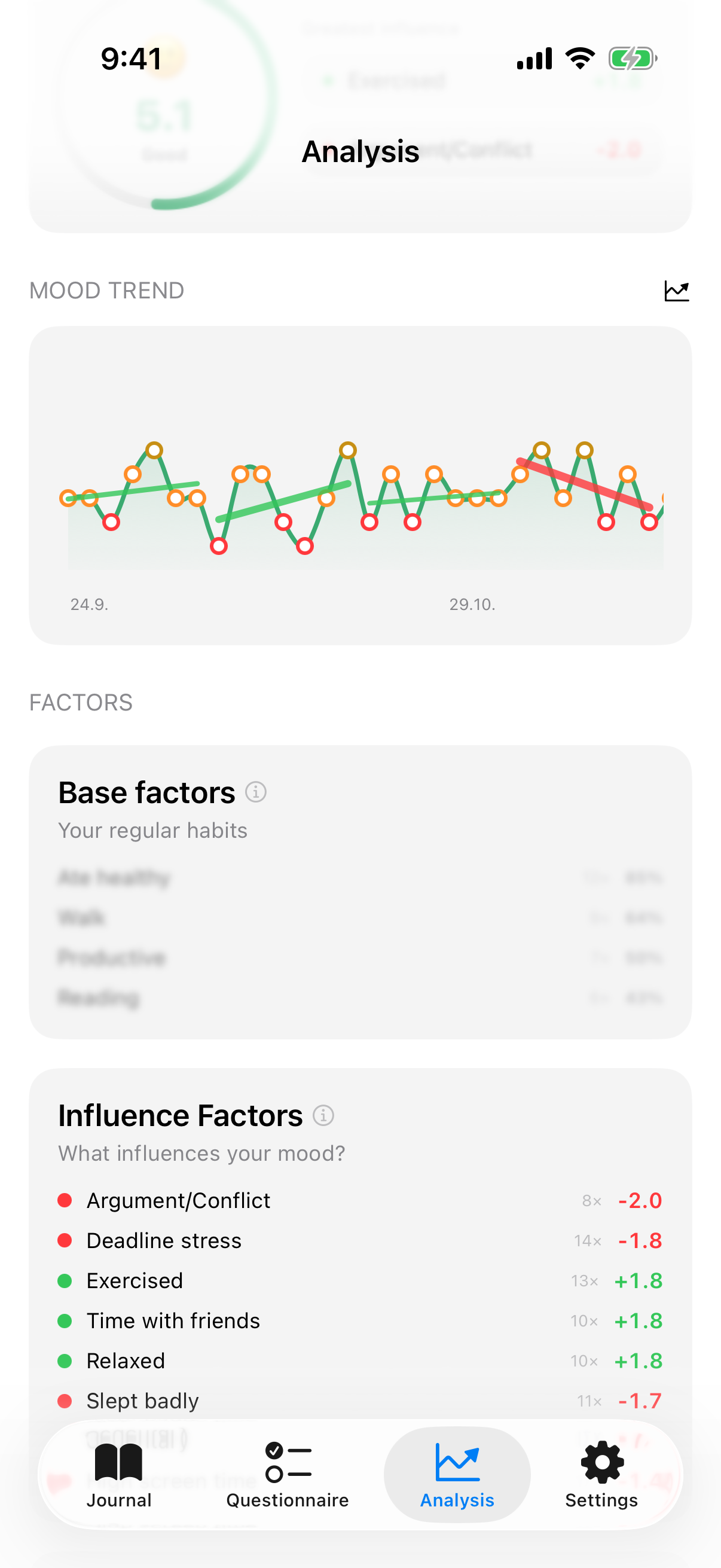
InnerPulse divides your factors into two groups:
Base factors (60% or more of your entries): These are your habits. The app shows their frequency and mood stability.
Impact factors (below 60%): Factors that don't appear every day, and precisely because of that, they're measurable. InnerPulse calculates the "with vs. without" effect. For example: "Exercised: +1.6" means your mood is 1.6 points higher on average on exercise days. "Argument/conflict: -2.3" shows the negative impact.
The reliability of each value is indicated by a confidence score. The more data points, the more reliable.
Weekdays and statistics
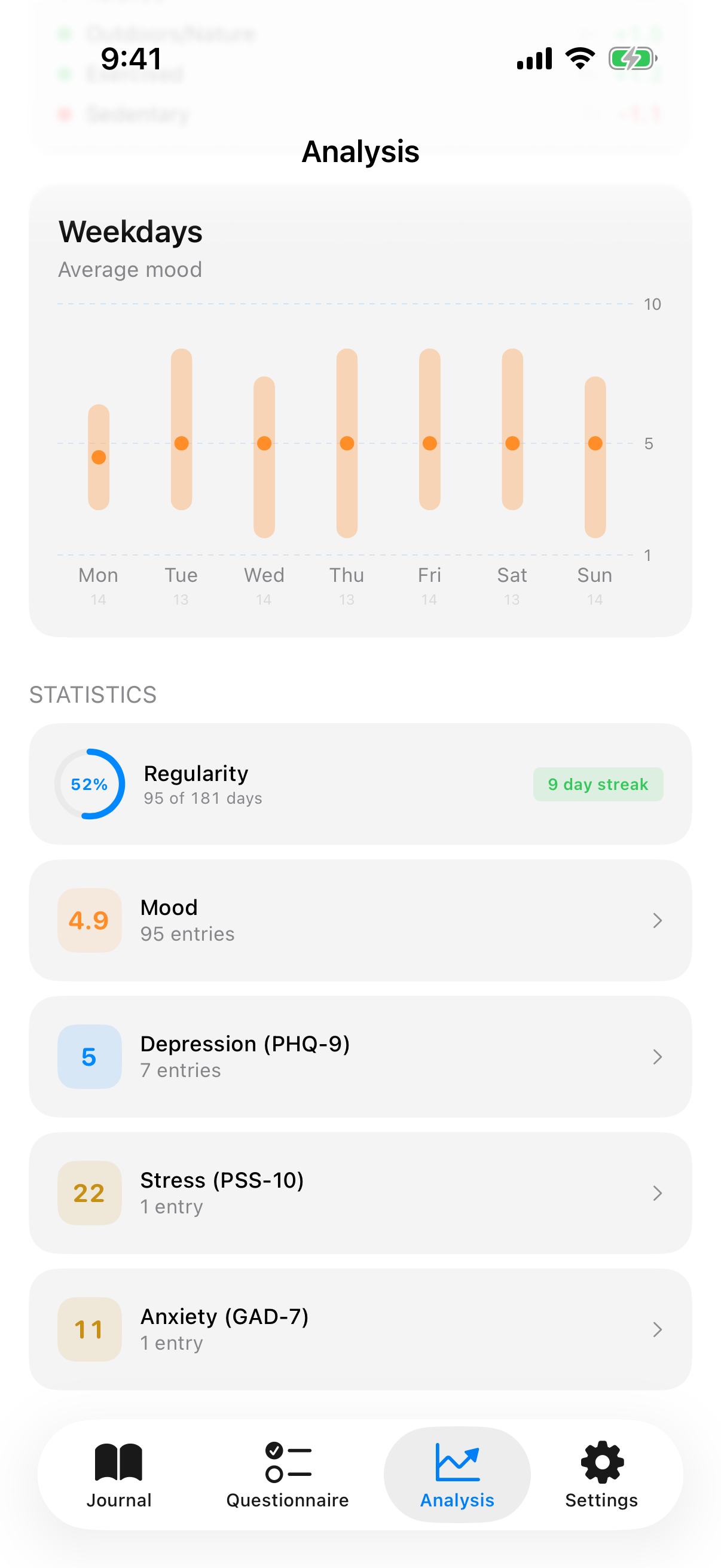
The weekday chart shows your average mood per day with minimum, maximum, and median. This reveals whether certain days are systematically better or worse.
Statistics show you:
- Consistency: How many days you've tracked and your current streak
- Mood: Average across all entries
- Questionnaire results: Current scores for Depression (PHQ-9), Stress (PSS-10), and Anxiety (GAD-7) at a glance
Your data belongs to you: privacy and export
InnerPulse stores all data exclusively on your iPhone. There's no cloud sync, no account, no server.
- No tracking: No analytics, no Firebase, no crash reporting
- No account: No email address or registration required
- Face ID / Touch ID: Protect the app with biometric authentication, with configurable timeout
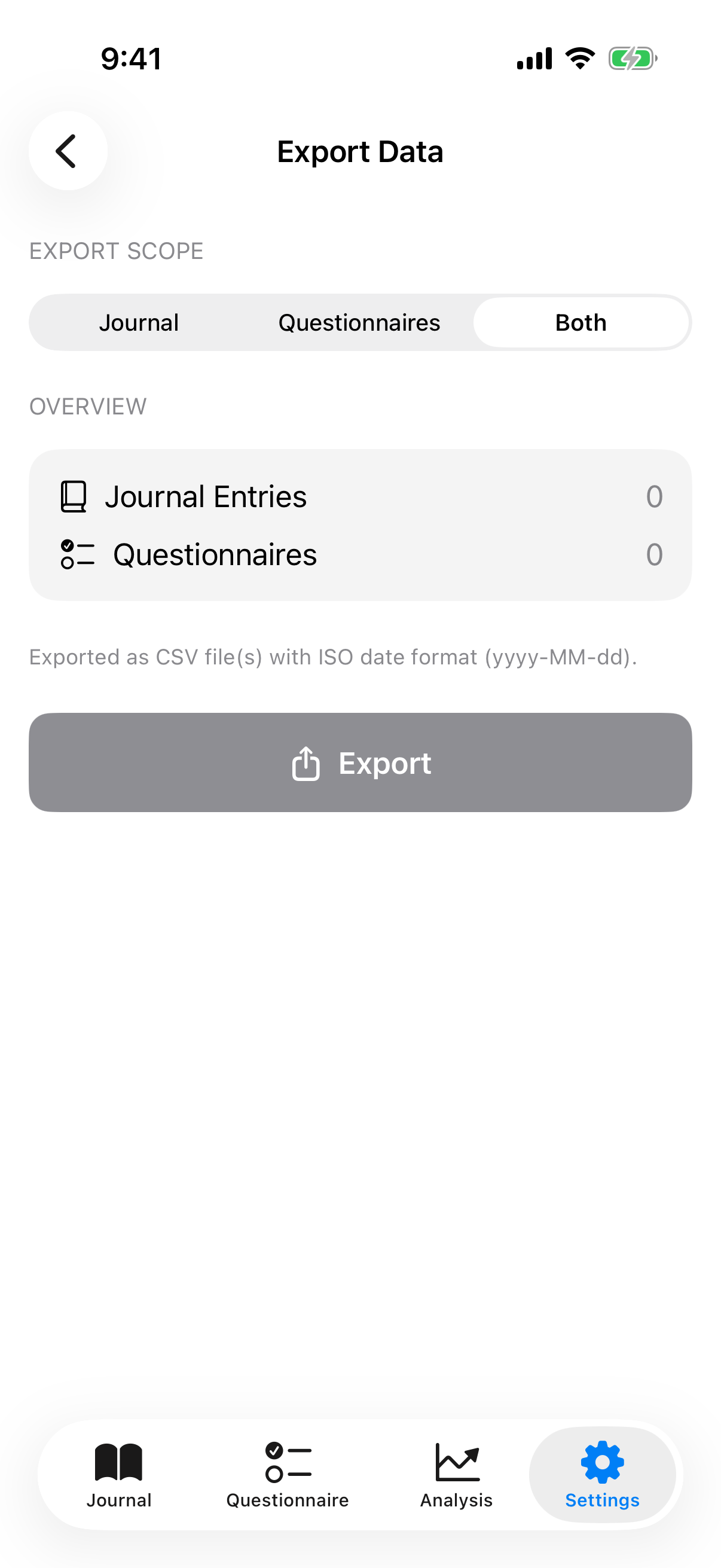
- CSV export: Export journal entries and questionnaire results as CSV files. Ideal for conversations with your therapist or doctor. Choose whether to export the journal, questionnaires, or both.
Settings: InnerPulse adapts to you
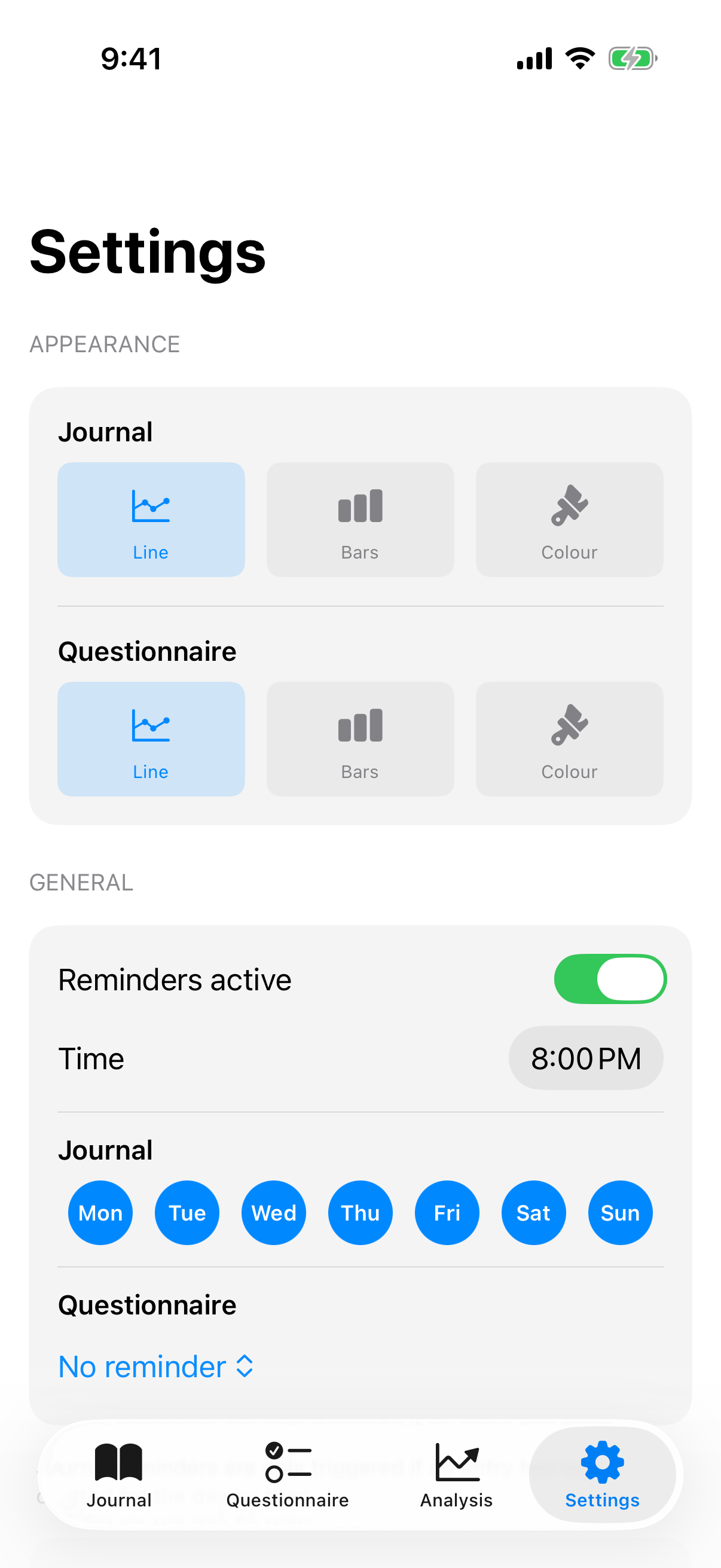
Display
Choose one of three chart styles for both journal and questionnaire charts: Line, Bars, or Color.
Reminders
Enable daily reminders and configure:
- Time: When should the reminder arrive? (Default: 8:00 PM)
- Weekdays: Which days do you want to be reminded?
- Questionnaire interval: How often should the app remind you about a clinical questionnaire?
The reminder is smart: if you've already made an entry on a given day, it's skipped.
Factor management
Under "Factors & Categories," you manage your 82+ factors: show or hide them, create custom ones, and view detected weekday patterns (e.g., "You select Exercise on 80% of Tuesdays").
InnerPulse is available on the App Store as a one-time purchase for 4.99 EUR, no subscription, no hidden costs. Shareable with your entire family through Family Sharing.