
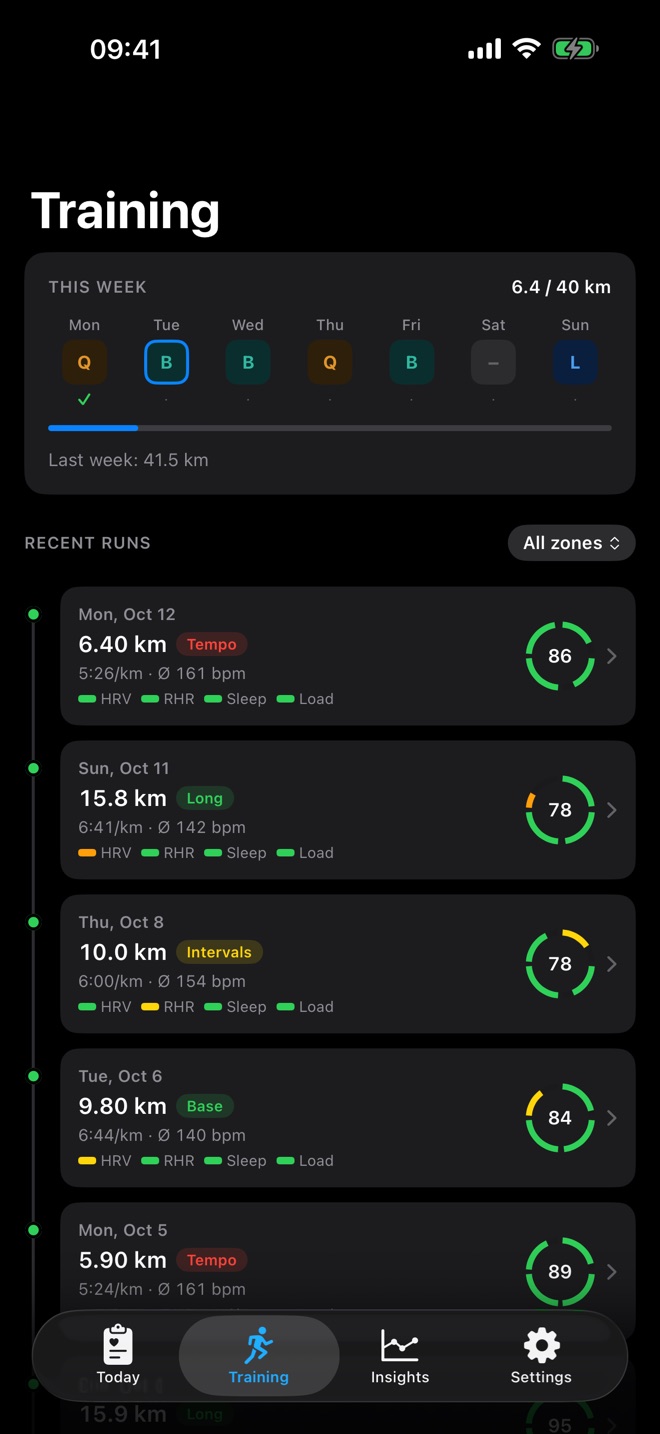
Day types
Under Settings › Weekly plan you give each weekday a type:
- B, Base: a calm steady run
- Q, Quality: tempo or intervals, if your score allows it
- L, Long run: the long session of the week
- Rest: no run planned
You also set your weekly goal in kilometres, 40 km by default. The Training tab and the weekly plan widget show your distance against this goal.
How the plan shapes the recommendation
RunReady combines three things: your score, the limiting sub-score and the day type. An example: score 85, quality day, but sleep is below target. RunReady recommends tempo with a note to reduce the volume. If the score is not enough for quality, the app suggests an easier session that day.
Plan adjustment
Plan adjustment is off until you turn it on under Settings › Plan adjustment. Then:
- If today is a quality day and your score is below 85, RunReady moves the session to the next base day of this week that has no quality day directly before or after it.
- If your score is below 45, today becomes a rest day.
The adjustment applies only to the current week. From Monday your plan applies again. The recommendation mentions the move in a line of its own, and the Training tab shows the adjusted plan.
Question not answered?
Write to me from the app under Settings › Send Feedback. Version and device are already in the email.
Or email marvin.blome@gmail.comNot installed yet?
RunReady runs on iPhone with Apple Watch. No subscription, no account.
Get RunReady