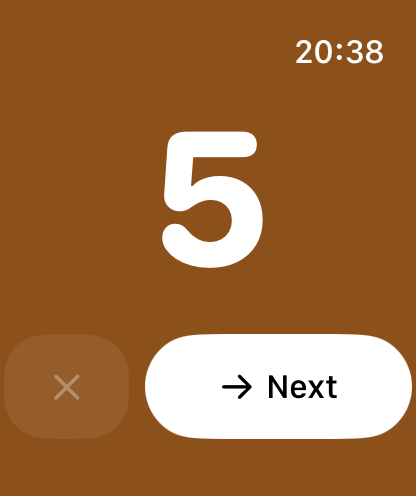
Since version 4, InnerPulse also runs on the Apple Watch. The watch app is deliberately reduced to the essentials: one entry in seconds, right on your wrist, without picking up your iPhone. Everything you log on the watch automatically lands in your iPhone app.
You need watchOS 11 or newer. If the iPhone app is installed, you can add the watch app via the Watch app on the iPhone or directly from the App Store on the watch.
The iPhone stays the source of truth. The watch is the quick input and the quick glance; the depth (analysis, questionnaires, settings) lives on the iPhone.
Quick entry with the Digital Crown
Open the app on the watch. You see a large area in the mood color and the current value. Turn the Digital Crown to set the mood from 1 to 10. Each step gives a light haptic tick, so you feel the value even without looking closely. The color moves with the value from red through orange and yellow to green.
Tap Next to confirm the factors. If you're updating a day you already tracked, you save directly with Save.
Confirm factors
After the mood, on a new entry the watch shows you matching factors. They are sorted into two levels:
- Auto-activated factors sit at the top and are already preselected. They come from your weekday rhythm and, if connected, from Apple Health (such as enough sleep). You only have to confirm them or deselect them individually.
- Smart suggestions below are tappable but not selected at first. They come from the same logic as the suggestions on the iPhone and match the weekday, time of day and your recent entries. How these suggestions come about is described in the chapter Factors.
A hint reminds you that the full factor list is available on the iPhone. The watch shows a curated selection so input stays quick. Tap Save to finish the entry.
Today at a glance
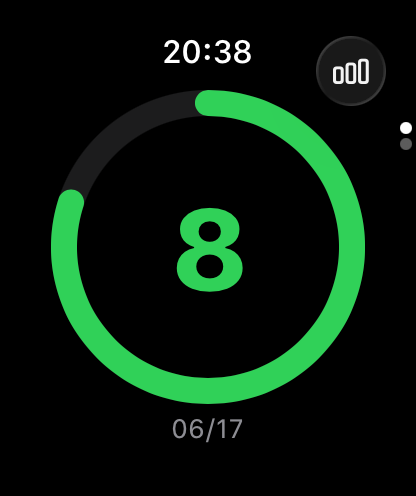
The today view shows you the state of the current day. If you already tracked today, you see a colored ring with your value and the date. A tap opens the entry to update it. If you haven't recorded anything yet, you see a plus circle, and a tap creates a new entry right away.
The watch keeps one entry per day. When you change today's value, you update that entry instead of creating a second one. Multiple entries per day stay reserved for the iPhone.
Weekly stats
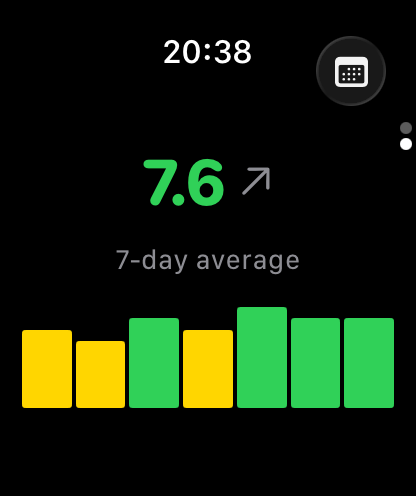
The second view summarizes the last seven days: the average of your mood with one decimal place, a trend arrow (up, down or steady) and a seven-bar overview where each day carries its mood color. Days without an entry stay gray.
You switch between Today and Week via the button in the top corner, by swiping or by turning the crown.
Complications on the watch face
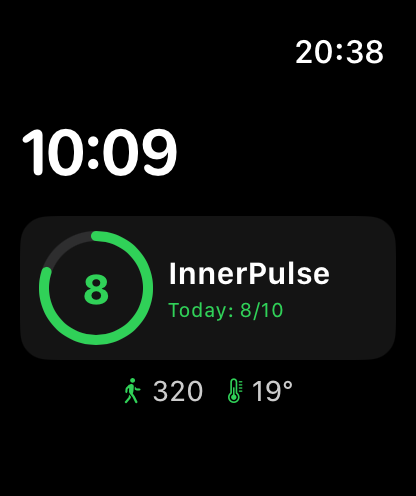
InnerPulse brings complications for your watch face. Depending on the style, they show your mood value for today as a small ring or as a number. In the Smart Stack, a wider variant appears with value, trend arrow and a small seven-day line.
A tap on a complication opens the app. The display updates automatically as soon as you create, edit or delete an entry, on the watch as on the iPhone.
Sync with the iPhone
Watch and iPhone sync in both directions. If you record something on the watch, it shows up on the iPhone, and the other way around. The sync also works offline: if both devices are out of range right now, the entry is caught up as soon as they reach each other again. For changes on the same day, the most recent edit wins, so nothing gets duplicated.
The factor list the watch suggests to you is regularly updated from the iPhone. That keeps your auto factors and suggestions current on your wrist too, without you having to manage anything there.
Why there are no questionnaires on the watch
The clinical questionnaires like PHQ-9 or GAD-7 are deliberately only on the iPhone. They are meant for a calm, complete answering on the larger screen. A shortened input on the wrist would weaken the clinical validity. For check-ins you therefore switch to the iPhone, see chapter Check-in Questionnaires.
What to know
- The watch is meant for the quick entry. Trends, correlations and settings are still found in the chapter Analysis & Patterns and in Settings on the iPhone.
- The watch keeps one entry per day. Saving again updates today's value instead of creating a second one.
- The sync runs offline too. You don't have to wait until both devices are connected; the entry is caught up automatically.
- Auto factors are based on your rhythm, on Apple Health and on the weather. More on this in the chapter Apple Health & Weather.
- Complications update on their own. You don't have to refresh the watch face manually.