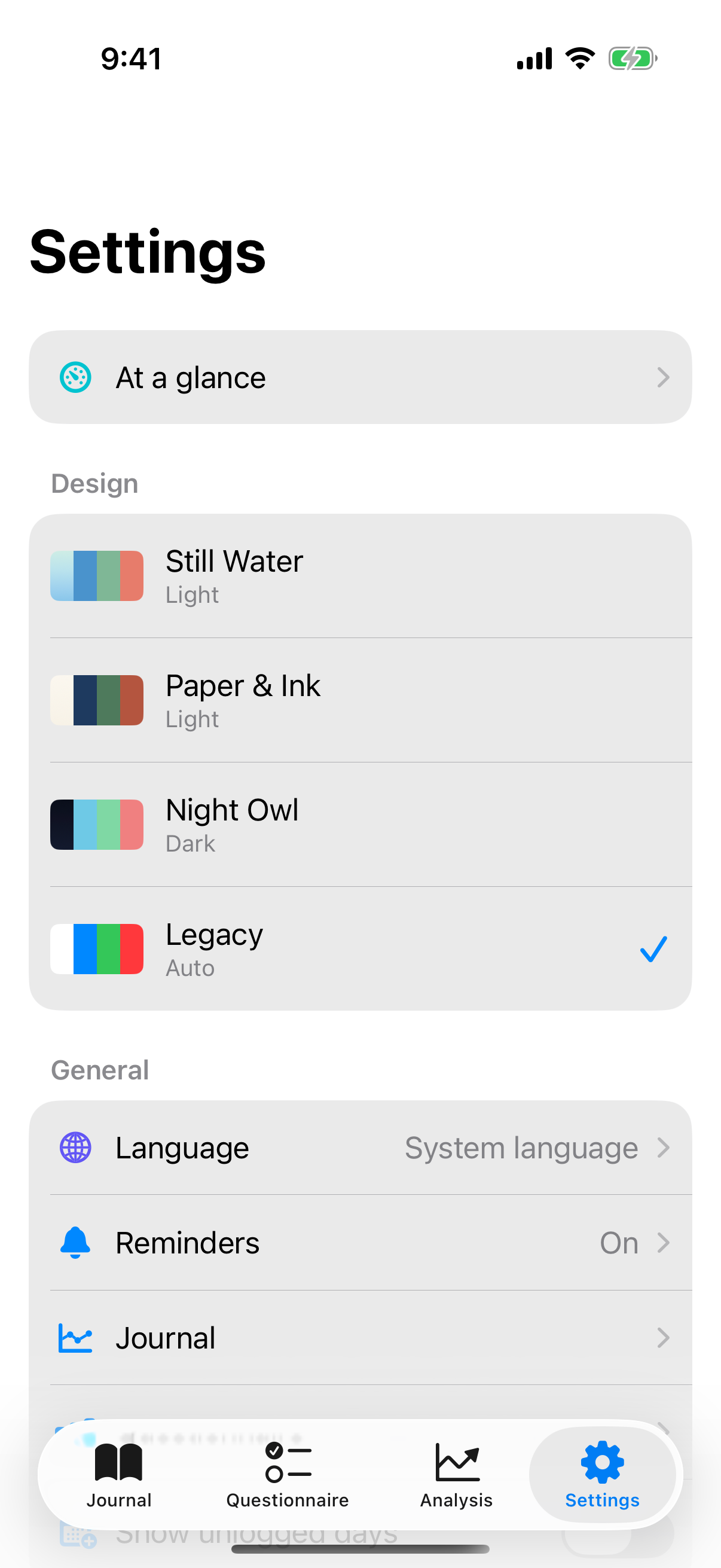
In settings you adjust InnerPulse to your rhythm. The sections are grouped by topic and follow the order they appear in the app: Design, General, Security and Data, Influence Factors, About. At the very top sits the At a glance row. What is big and complex has its own chapter and is only briefly touched on here.
At a glance
The first row in settings opens At a glance. The page shows the state of your most important settings:
- Reminders: the time of the journal reminder or Off, with the questionnaire interval below it.
- App lock: you change the timeout right on this page.
- Smart factors: whether Apple Health and weather are on or off.
- Factors: the number of your active factors.
- Storage: the number of your entries and the space your photos and files take up.
- Device sync: On or Off, with sync on also the time of the last sync.
Every row except the app lock opens its page. In split screen, meaning on the iPad in landscape or the iPhone Duo in book format, the right column shows this page as soon as you open settings.
Design
In the design section you set the theme.
Theme
Four themes are available:
- Still Water: calm teal, light.
- Paper & Ink: warm beige tones, light.
- Night Owl: indigo gradient, dark.
- Legacy: follows the system settings, light or dark automatically.
Every theme brings its own mood palette so that mood colors stay readable on a colored background. The change runs as a soft crossfade over about half a second, not a hard switch. The choice is saved locally in iOS user defaults. There is no cloud sync for theme preferences.
General
Here you'll find language, reminders, the chart settings for journal and questionnaire, and the switch for unlogged days.
Reminders
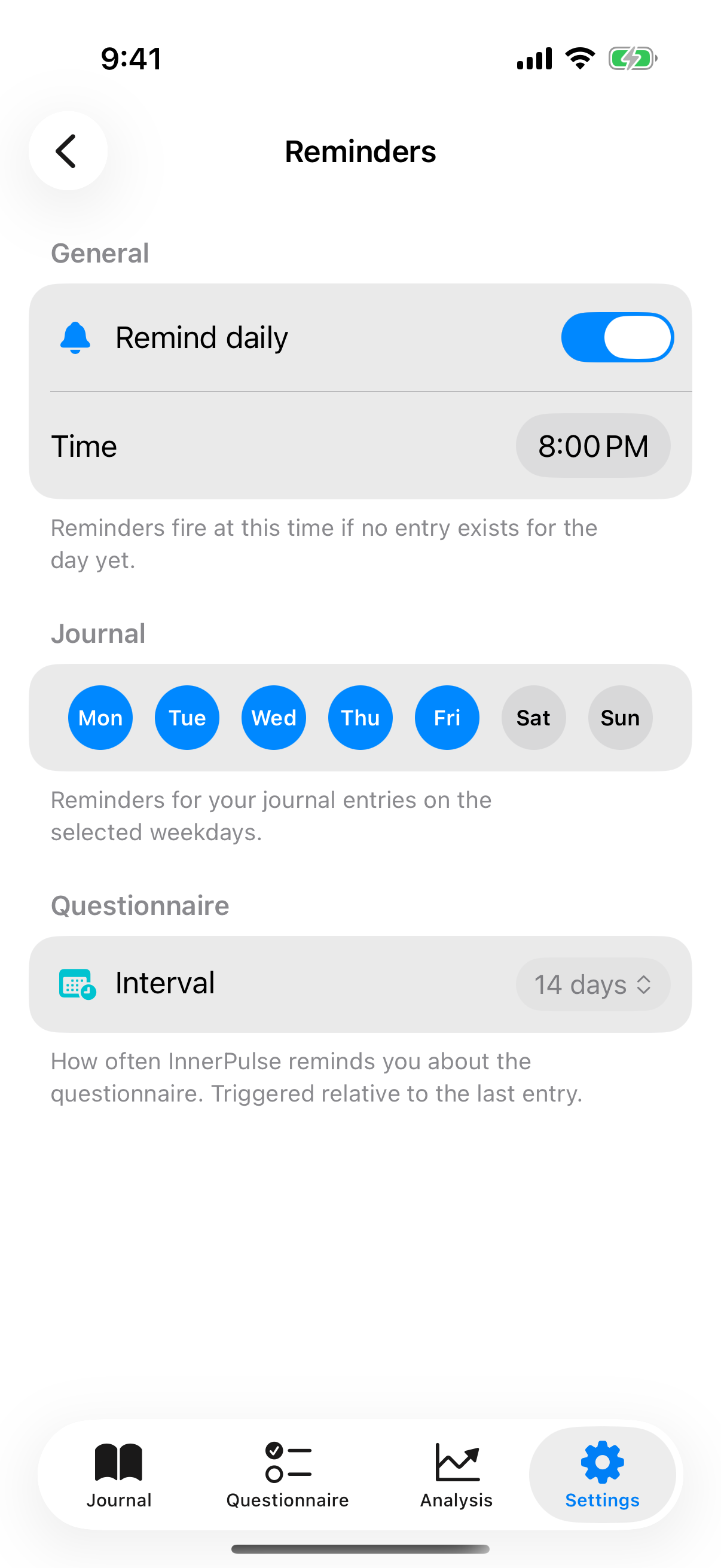
Reminders are split into two areas: journal and questionnaire.
Journal: master toggle plus time picker. Below it a weekday strip where you turn individual days on or off. So you get peace on weekends, if you want. The app only sends a reminder if no entry exists yet on that day. This behavior is called smart suppression and ensures the app doesn't remind you of things you've long since done.
Questionnaire: interval picker with default options (daily, 7, 14, 30, 90 days) and a custom option (1 to 365 days). The reminder is relative to the last test. If you let the test become overdue, the app nudges you daily until you do it or disable the reminder.
The first time you activate it, iOS asks for notification permission. Without that permission the app shows a hint. If reminders don't arrive, check the chapter Troubleshooting.
Charts and entry rows
Under Journal and Questionnaire you choose the chart style of each tab: Line, Bars or Colour. Below that you decide what the list rows show, such as weekday, date, time and the start of the note, and in which date format. Since version 6 you can also add your Feelings to the journal row. A sample row shows every change right away.
Show unlogged days
Also under General sits the switch Show unlogged days. When it's active, the journal shows days without an entry as a subtle, dashed tile. A tap on it creates an entry for exactly that day. The feature is deliberately kept guilt-free, without a streak and without a reproachful tone. How it looks in the journal is in the chapter Mood Journal.
Security and data
This section contains app lock and the privacy center.
App lock
Under security you turn on the biometric lock. Set a timeout: Never, Immediately, 1 minute, 5 minutes or 15 minutes. After it elapses, the app asks for Face ID, Touch ID or the device passcode the next time you open it. The lock screen shows nothing of the app's content until authentication succeeds. More background in the chapter Privacy & Security.
Privacy center
Tap Privacy and Data to get to the privacy center. There you see counters for your entries and questionnaires, can export, import or delete everything. Which permissions the app uses and what happens during deletion is in the chapter Privacy & Security. The details on export and import are in the chapter Export your data.
Device sync
In the privacy center you find the Device sync row. There you turn on the optional, end-to-end encrypted sync between iPhone and iPad with Sync on this device. It is off by default, and you turn it on separately on each device. How it works and what it transfers is explained in the chapter Privacy & Security. On the same page, Sync photos and files adds photos and files up to 25 MB; Upload only over Wi-Fi is on by default. Before the first sync, the app asks for your consent with Turn on device sync?.
Influence Factors
Pattern detection sets the minimum number of times a connection must occur before InnerPulse shows it: 3, 5, 7 or 10, default is 5. The threshold applies wherever the app counts: to weekday patterns, to feelings with factors and to a factor's interactions. A low value shows something sooner, a high value only what has repeated often.
The factor management is reachable as its own sub-page. It has areas for Detected patterns (weekday affinities that the app detects from your data), Factors and categories (hide system factors, create your own, rename) and Intelligent factors (Apple Health and weather).
Here you also adjust individual factors. Since version 4, every factor can be edited (title, symbol, category, tendency), and per factor you can enable an intensity slider that shows a five-step scale in the entry instead of the simple selection.
Because factors are their own concept with their own logic, they have their own chapter: Factors. Apple Health and weather are detailed in the chapter Apple Health & Weather.
About
In the About area you'll find:
- the app version,
- a button Send feedback that opens the iOS Mail composer (with auto-footer for version, iOS version and device model, so support requests can be triaged),
- the link Rate the app on the App Store that opens the native review dialog,
- references to the privacy policy and this help page.
What to know
- You can hide system factors, but not delete them. That protects against accidental data loss if a hidden factor is referenced in old entries.
- Theme, reminders, app lock, Apple Health and weather stay on each device. With device sync on, only factors, categories and the display settings sync: chart styles, row layout, entry layout and pattern threshold.
- If reminders don't arrive, check in iOS under Settings, Notifications, InnerPulse whether they are allowed and no focus mode is active. More tips in the chapter Troubleshooting.