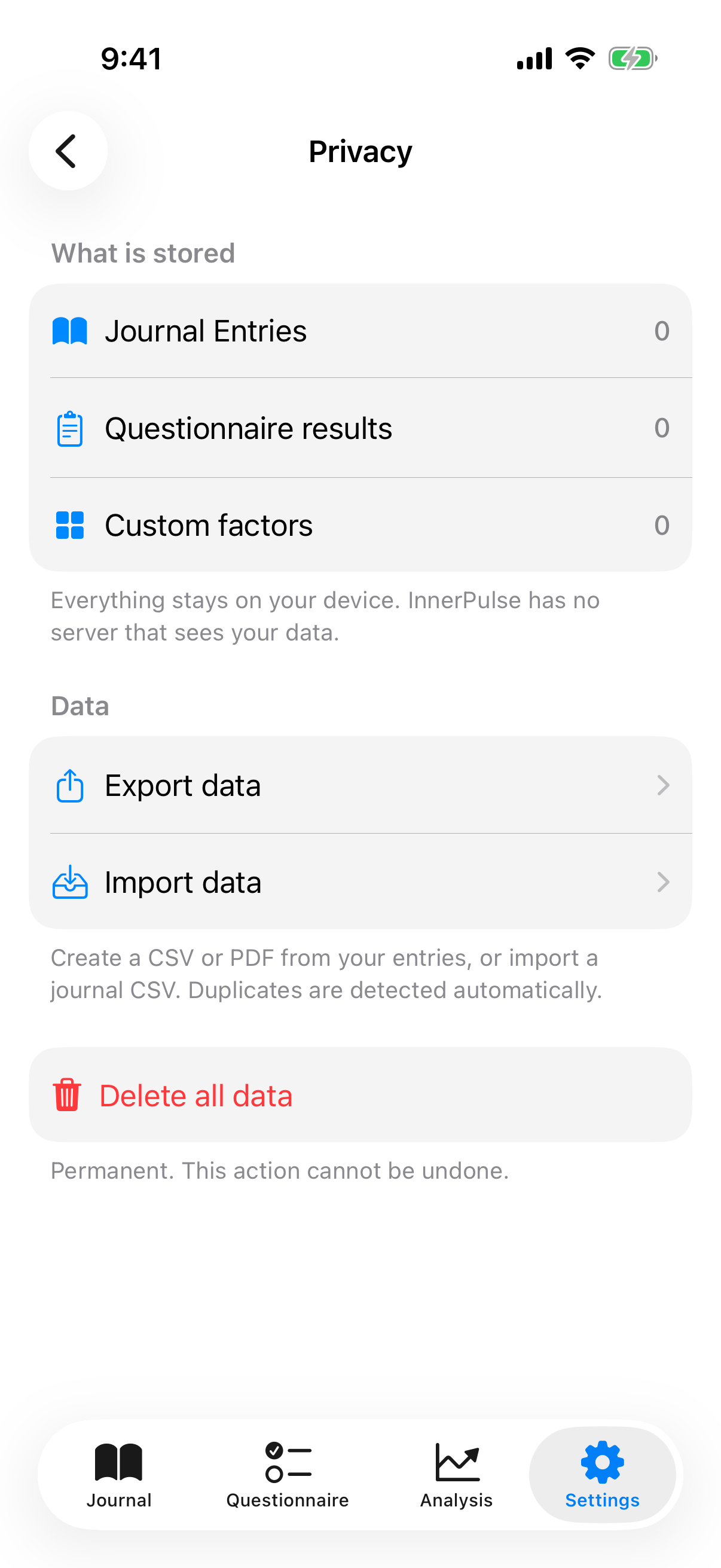
InnerPulse is privacy-first from the start. There is no server, no account, no analytics. This chapter explains what that means technically.
Everything stays local
The app stores your entries, check-ins, factors and settings in a SwiftData database inside the protected app container on your iPhone. This container is shielded by iOS against access from other apps. Nothing of it leaves the device through InnerPulse.
Apple Health data that InnerPulse reads stays in Apple Health. The app doesn't copy it into its own store. It only evaluates it at runtime to generate factor suggestions.
No account, no cloud
You don't sign in. You don't create a password, besides the device passcode. There is no synchronization to other devices. Every install starts with an empty database.
Which permissions the app uses
InnerPulse only asks for what it needs, and only when you activate the respective feature:
- Notifications: for journal and questionnaire reminders. Asked as soon as you turn on reminders.
- Face ID, Touch ID, device passcode: for app lock. Asked as soon as you activate the lock.
- Apple Health: for factor suggestions and optional writeback. Asked per data type.
- Location (while using the app only): for weather factors. Asked as soon as you activate weather.
- Microphone and speech recognition: for voice dictation of notes. Asked on the first tap of the mic button. Recognition runs on-device via Apple Speech, without cloud upload.
You can revoke or grant each permission again in iOS under Settings, Apps, InnerPulse.
No tracking
InnerPulse contains no analytics, no tracking pixels, no Firebase, no Sentry and no other third-party SDK for behavioral telemetry. At runtime, the app makes not a single network call to InnerPulse servers. There aren't any. The only external endpoints the app reaches at all are Apple-owned services:
- WeatherKit, if you have weather factors activated.
- App Store Connect for in-app review dialogs, if you tap the rate-the-app button.
- Apple Speech, though on-device, no cloud endpoint.
iCloud backup
If you have iCloud backup enabled, InnerPulse is typically included like every other app. The data lands in an encrypted copy in your iCloud. Apple can hand out this copy under certain legal conditions, as long as your iCloud is not protected with Advanced Data Protection.
If you want to avoid this, you can check in iOS Settings, Apple Account, iCloud, Manage Storage, Backups, [device name], Apps whether InnerPulse appears in the list and disable it. iOS however doesn't show every installed app in this list, usually only those with a larger data footprint. If InnerPulse currently uses only a few megabytes, it may not be listed individually and is automatically included in the overall backup, without you being able to deselect it individually.
The safest option, if you want to fully control the backup path, is a regular manual data export as CSV plus complete deactivation of iCloud Backup for the device. Alternatively, you can wipe the app fully in the privacy center before the next backup starts.
App lock
In Settings you activate the app lock. The app then asks the next time you open it, depending on timeout, for Face ID, Touch ID or device passcode. Until authentication, InnerPulse shows an empty lock screen; no app content is visible. This is a second layer of protection if someone gets hold of your unlocked device, e.g. partner, family or at checkpoints.
Pick the timeout matching your security needs:
- Never: no lock. Default after install.
- Immediately: lock on every app switch. Secure but inconvenient.
- 1 minute, 5 minutes, 15 minutes: lock after background time. Good middle ground.
Privacy center
In settings, tap Privacy and Data to open the privacy center. It shows:
- Counters of your journal entries, questionnaire results and custom factors.
- Quick access to export, import and delete functions.
- A footer text confirming that everything stays local.
Hide mood score
In the privacy center, under Privacy, you'll find the switch Hide mood score. It affects the lock screen accessory: when it's active, it shows only a neutral symbol instead of your mood value. Handy if your lock screen is also visible to others and your mood score shouldn't lie open. More on the widgets themselves is in the chapter Widgets & Lock Screen.
Delete all data
In the privacy center you'll find a red button Delete all data. It asks for confirmation twice. On click, the following are deleted:
- all journal entries,
- all questionnaire results,
- all custom factors and custom categories,
- all smart suggestion data (weekday patterns, co-occurrence scores).
What is not deleted:
- Apple Health samples that InnerPulse itself wrote. If you used the writeback to Apple Health, those samples stay in your Apple Health. Delete them as needed in the Health app.
- iCloud backups, if active. Apple manages those separately. Earlier backups can still contain data until they are overwritten by a new backup or you manually delete the backup image.
Deleting data by uninstall
When you delete the app from the home screen, iOS removes the complete app container, including the database. That is the final variant, though without a confirmation dialog from the app. Apple Health samples and iCloud backups remain as described above.
CSV exports are unencrypted
CSV files from the export are in plain text. Treat them like your medical records. If you share them by mail or cloud, watch the recipient and use end-to-end encrypted channels if possible. PDF exports are also unencrypted. More tips on secure sharing are in the chapter Export your data.
What to know
- InnerPulse sends no data to the developer, third parties or ad networks.
- The app has no ads, neither banners nor interstitials. It is a paid app, not data-financed.
- The app lock is optional but recommended if the device is also used by other people.
- If you really want to stay anonymous and don't want to use existing iCloud backup configuration, export manually on a regular basis. More on this in Export your data.