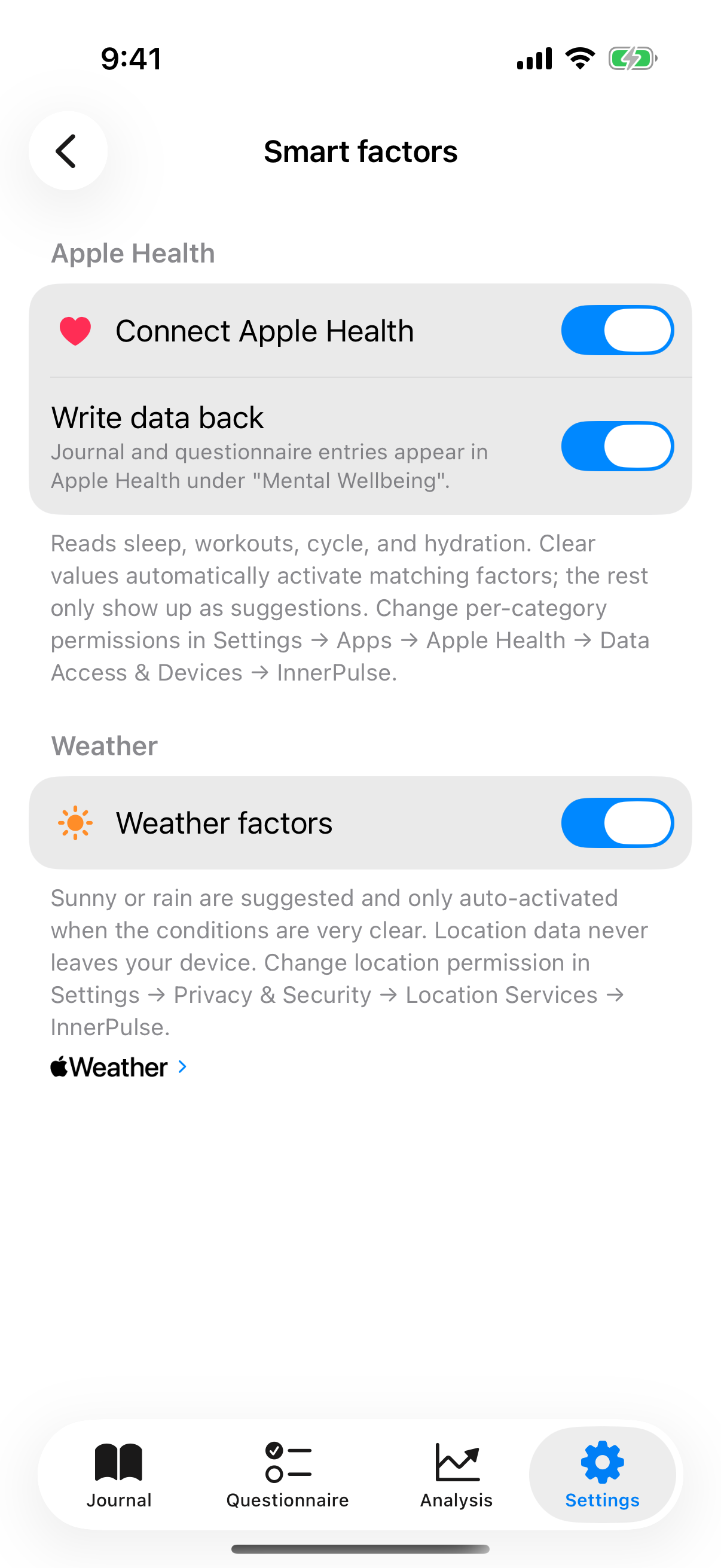
InnerPulse sets or suggests factors for a new entry, based on data from Apple Health and, if you want, the current weather. The integration is fully opt-in. By default, both are off.
Activate HealthKit
In Settings go to Intelligent factors and turn on the Apple Health master toggle. On first activation, iOS asks which data types you grant. InnerPulse requests these read types:
- Sleep (start, duration, awake phases, deep and REM sleep)
- Workouts (type, duration, indoor or outdoor)
- Steps
- Cycle data (menstruation, abdominal cramps, back pain)
- Water (water intake from the Health app or other sources)
Since version 6, InnerPulse no longer requests active energy, stand hours, mood changes or bloating.
You decide per data type what you share. InnerPulse also works without any sharing and without HealthKit being activated at all.
What happens automatically
On every new entry, the app reads the day's Health data and sorts the matches into two tiers:
- InnerPulse sets clear matches directly and marks them with a small heart. Examples: seven hours of sleep or more sets Enough sleep, under six hours sets Little sleep, a workout sets Exercised plus the matching sport, and an outdoor workout of 30 minutes or more adds Outdoors/Nature. Menstruation with cramps or back pain sets Period cramps, and two liters of water or more sets Drank enough water.
- InnerPulse only suggests six factors: Slept well, Slept badly, Walk, Moved a lot, Water sports and Horse riding. For these, the Health data is less clear. The suggestions appear above the factor selection under Suggested by Apple Health, each with a short reason from your data. Tap the plus to accept a suggestion, tap the ✕ to dismiss it.
Since version 6, InnerPulse no longer sets No exercise, Sedentary, Indoors only, PMS or Didn't drink enough from Health data. You pick these factors yourself when they apply. Apple Health never suggests a factor you have hidden.
If you change the date of a new entry to a different day, InnerPulse evaluates the Health data for that day again. Factors you picked yourself stay in place.
Thresholds and personal baseline
The sleep factors use fixed thresholds: seven hours or more sets Enough sleep, under six hours sets Little sleep. For Early to bed and Late to bed, InnerPulse compares against your typical bedtime over the last 30 days: if you go to bed an hour earlier or later, the app sets the factor. Until at least seven nights of data exist, fixed time windows apply. The app suggests Moved a lot when you take at least 30 percent more steps than on a typical day of the last 30 days.
Apple Health often contains multiple sleep samples from different apps on the same day (Watch plus third-party app). InnerPulse recognizes this and merges overlapping intervals. You don't have to decide which source is "correct".
Learning effect
If you remove an auto-set factor three times in a row, the app stops setting it from Health data. If you keep it, the counter resets. That's how InnerPulse learns your style. If you never want a factor from Apple Health, hide it. More on this in the chapter Factors.
Apple Health writeback
When you activate Apple Health, a second toggle Write data back appears. When you turn it on, InnerPulse writes two kinds of data back to Apple Health:
- Mood values as State of Mind: Every journal entry lands in Apple Health under "Mental Wellbeing". InnerPulse maps the mood value 1 to 10 to the iOS scale, and other iOS apps can include it in their analyses. If you picked feelings in the entry, Apple Health takes them over as the feelings of that entry. Without feelings, a word matching the mood value describes the entry. If you edit an entry, InnerPulse replaces it in Apple Health instead of creating a second one.
- Questionnaire results as Scored Assessments: Completed PHQ-9 and GAD-7 are saved as clinical assessments in Health. K10 and PHQ-4 are not written because Apple Health doesn't officially support these test types.
Both depend on that one toggle. If you turn it on, both data kinds will be written going forward. If you turn it off, writing stops for both. Data already saved in Apple Health stays there. If you want to remove it, do so in the native Health app.
Weather factors
Under Intelligent factors you'll find a separate Weather factors switch. Turning it on, InnerPulse asks once for location permission (only while using the app, not in the background). The app then calls WeatherKit and, when appropriate, suggests:
- Sunny, good weather on clear days,
- Gray, rain on rainy or persistently cloudy days.
The weather result is cached for 30 minutes so that every new entry on the same day doesn't repeatedly use location and the WeatherKit API. Your location is never sent to an InnerPulse server. There isn't one.
What to know
- HealthKit and weather are off by default. Without your consent, nothing happens.
- The app requires no background location permission. "While using the app" is enough.
- You can revoke any data type in iOS at any time under Settings, Apps, Apple Health, Data Access and Devices, InnerPulse.
- If HealthKit suggestions don't appear, check in iOS whether permission is actually granted per data type. Apple only returns "read allowed"; the actual presence of data is a separate matter. More in the chapter Troubleshooting.
- The mood writebacks stay in your private Apple Health sphere. InnerPulse itself doesn't see them additionally. More on this in the chapter Privacy & Security.