Factors are the second big data concept besides mood. While mood says "how I'm doing", factors say "what happened during the day". The combination of both is what makes correlations and patterns possible in the first place.
This chapter explains where the suggestions come from, how you create your own factors and categories and how the app automatically detects weekday patterns.
What factors are
Factors are tags that you assign to every entry. "Exercised", "Coffee", "Argument/Conflict", "Meditated", "Cycle week". Each factor belongs to a category like Sleep, Social, Self-care or Movement.
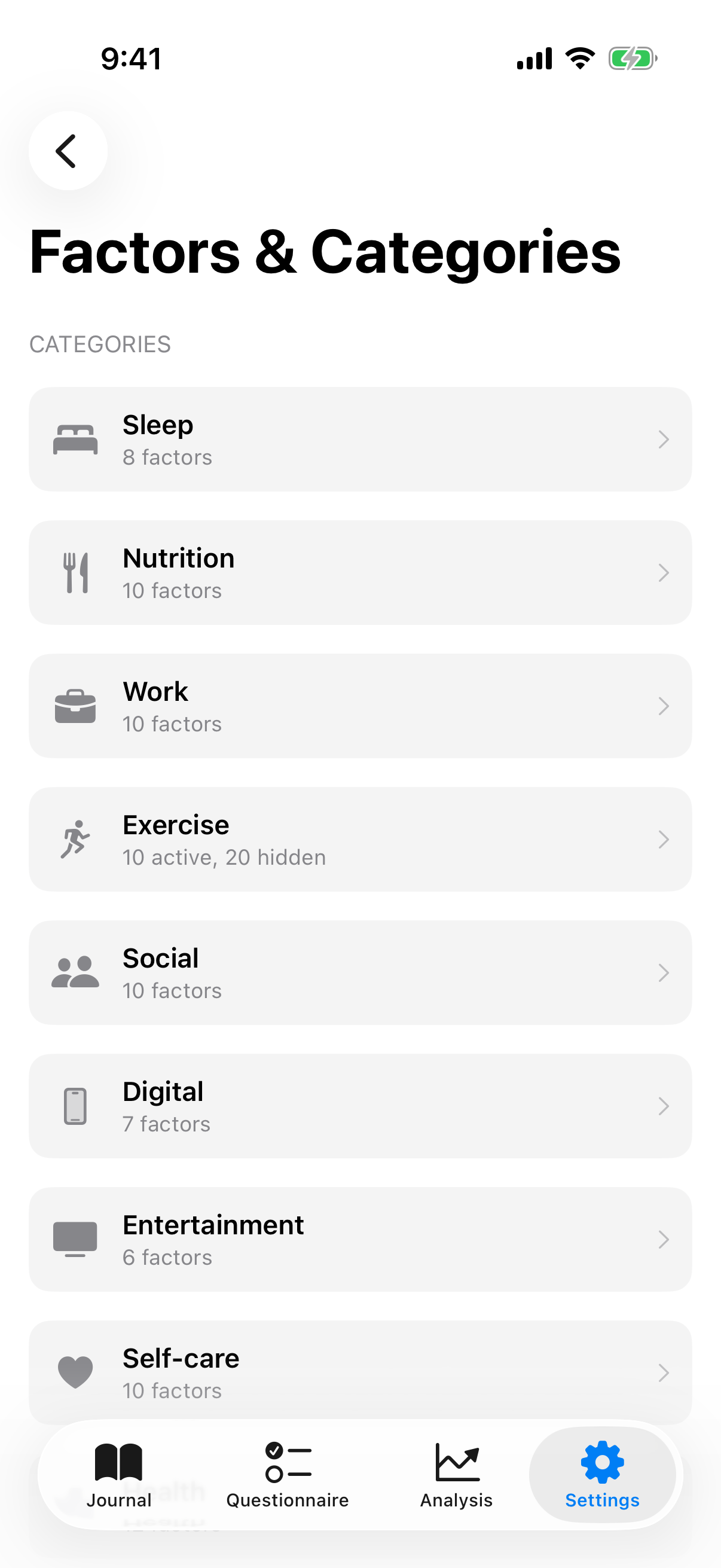
InnerPulse comes with an extensive collection of preinstalled factors, spread across eleven categories. On top of that come your own factors and categories, which you can freely create. Over time, the app learns which factors are important for you and which you rarely set.
The eleven system categories
The preinstalled factors live in the following categories:
- Sleep: Slept well, Slept badly, Enough sleep (7h+), Little sleep (<6h), Early to bed, Late to bed, Slept through, Woke up often.
- Nutrition: Ate healthy, Ate unhealthy, Home-cooked, Fast food, Drank enough water, Didn't drink enough, Coffee, Alcohol, High protein, Skipped a meal.
- Work: Productive, Unproductive, Focused, Unfocused, Deep work, Topic hopping, Relaxed day, Deadline stress, Left work on time, Overtime.
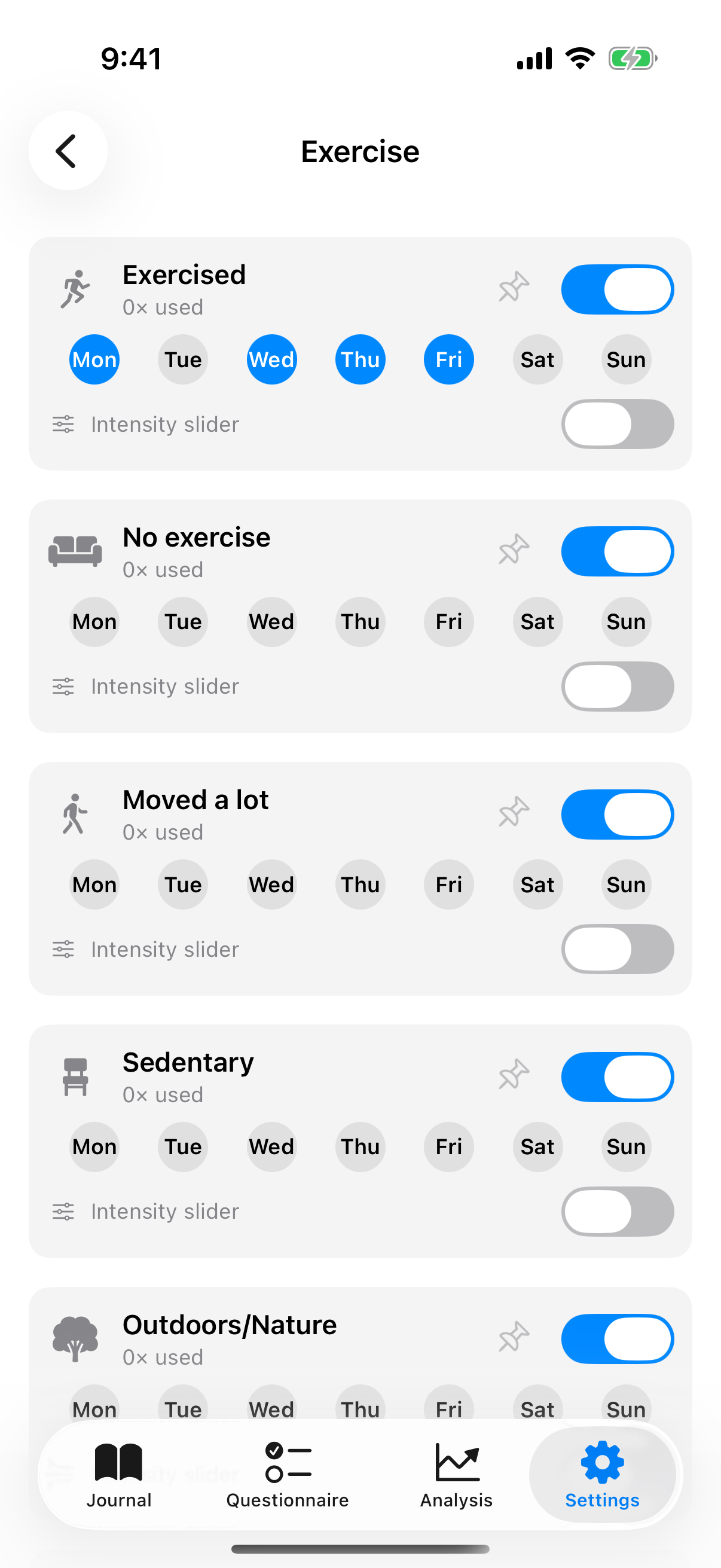
- Movement: Exercised, No exercise, Moved a lot, Sedentary, Outdoors/Nature, Running/Jogging, Weight training, Walk, Stretching/Yoga. Plus a larger selection of specific workout factors that activate via the Apple Health integration (Cycling, Swimming, Hiking, HIIT, Pilates, Dancing, Climbing, Tennis, Martial arts and more).
- Social: Time with friends, Time with family, Good conversation, Argument/Conflict, Felt lonely, Felt understood, Date/Romance, Met new people, Social event.
- Digital: Screen time, No phone before bed, Phone before bed, Social media doom-scroll, Social media break, Digital detox.
- Entertainment: Watching videos, TV shows, Movies, Gaming, Shorts, Doomscrolling.
- Self-care: Me time, No time for myself, Relaxed, Ruminating/Worrying, Hobby/Creative, Worked through, Meditated, Journaling, Listened to music, Reading.
- Health: Headache, Back pain, Cold/Sick, Allergies, Period cramps, PMS, Cycle week, Took medication, Took supplement, Energetic, Low energy/Tired, Digestive issues.
- Environment: Sunny/Nice weather, Grey/Rain, Noisy/Restless, Tidy environment, Messy environment, Traveling.
- Finances: Saved money, Unexpected expense, Salary/Income, Financial worries.
You can hide system factors but not delete them. That protects against accidental data loss. If an old entry references a factor you no longer see today, the connection stays intact.
Custom categories and factors
In the factor overview, tap New category. Pick name, color and symbol. Within a category, you then create your own factors.
Rename a custom category: Open the category and tap the pencil icon in the top-right toolbar. System categories are curated and keep their name. How you adjust individual factors, including the preinstalled ones, is in the next section.
Renaming without data loss: Factors have a stable UUID internally. When you rename a custom factor, the app automatically migrates the new name into all existing entries, into co-occurrence scores and into pair references. If you change "Stress" to "Work stress", the new name also appears in old entries and the entire history stays connected.
Deleting also removes it from old entries: When you delete a custom factor, it is removed from all entries where you had used it at the same time. If you delete a custom category, it takes its contained custom factors with it, and their references are removed from all entries too. If a factor is still in use, InnerPulse asks first and shows how many entries it will be removed from. With zero uses it is deleted without asking. Mood scores, notes and all other factors in the affected entries stay unchanged.
Edit factors
Since version 4 you can adjust every factor, including the preinstalled ones. Open the category the factor lives in and swipe on the factor until the edit field with the pencil symbol appears. Tap it. In the edit sheet you change:
- Title: the displayed name.
- Category: move the factor into another category.
- Symbol: the icon (see next section).
- Tendency: good, poor or any. It only influences the order of suggestions, not visibility.
Preinstalled factors are renamed for display only. Behind the scenes, every factor keeps its stable identity. If you rename "Exercised" to "Training", your entire history, the Apple Health detection and all analyses stay correctly connected. Your adjustments also survive app updates. If you set the title back to empty or to the original name, the default name returns.
Delete or hide: You can delete custom factors, but not preinstalled ones. Instead you hide them via the visibility switch in the factor row. That protects against a factor disappearing while it's still referenced in old entries.
Icon selection
When creating and editing, you pick the symbol from a curated grid. If the selection isn't enough, tap the cell with the three dots. The full SF Symbols selection opens with a search field and category filters like Health, Activity, Nature or Feelings. That way you quickly find a fitting icon for your factor or your own category.
Enable the intensity slider
In the factor row you'll find the switch Intensity slider. When you turn it on, the new entry no longer just asks "yes or no" for this factor, but shows a slider with five steps from low to high. Handy for anything that has an amount or strength: coffee, sports, stress, screen time.
That's exactly why some amount-based factors now have simpler names, e.g. Coffee instead of "Lots of coffee", because the amount is now mapped via the slider. How the app analyzes high and low intensity is in the chapter Analysis & Patterns. What the slider looks like in the entry is shown in the chapter Mood Journal.
Smart suggestions
When you start a new entry, the likely relevant factors appear at the top. They are not a random selection. InnerPulse computes per factor a score from six dimensions, each with its own weight:
- Weekday affinity (weight 5.0): If a factor is assigned to a weekday and today is exactly that weekday, it gets the biggest bonus. E.g. "Exercised" on Mondays.
- Frequency (up to 3.0): Overall frequently used factors stay visible because they are apparently relevant for you.
- Recency (up to 2.0): Factors you set in the last three entries get a bonus. Yesterday weighs strongest (+2.0), the day before (+1.5), three days ago (+1.0).
- Time-of-day affinity (up to 1.5): Some factors show up in the morning, others in the evening. This assignment is set per category as default and can be overridden by the user.
- Mood signal (1.0): If you currently choose a mood value of 4 or lower, negative factors get a bonus. At 7 or higher, positive factors get the bonus. At medium mood (5 or 6) this dimension is neutral.
- Co-occurrence (up to 1.5): Factors that you often set together with already chosen factors are suggested. If you choose "Argument/Conflict", "Slept badly" often appears too, because the app has seen this connection in your data.
Co-occurrence scores decay. With every new entry, all existing connections are weighted by factor 0.97. After 10 entries, a co-occurrence score retains about 74 percent of its value, after 50 about 22 percent. That keeps the model current and old, no longer matching patterns fade away.
Quick picks: pin, reorder, hide
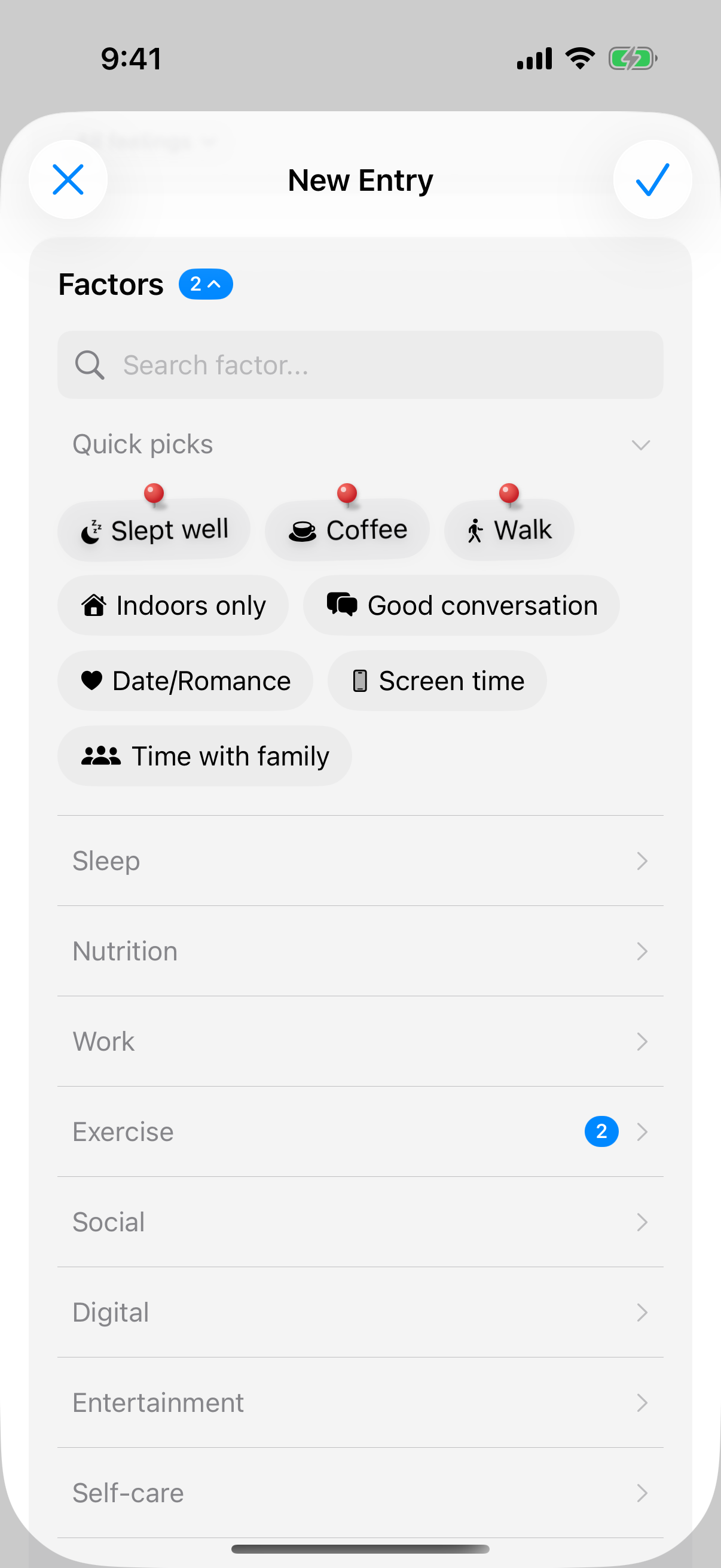
At the top of the factor selection in every entry sits Quick picks. It shows your pinned factors first, marked with a pin, then the smart suggestions. Each factor appears there only once. If you collapse Quick picks, the pinned factors stay visible. That keeps the factors you set almost every day one tap away.
You pin, reorder and hide directly in the entry: press and hold a factor, a category header or the heading Factors, or tap Customize Entry at the bottom of the editor. In customize mode:
- Tap a factor to pin or unpin it.
- ✕ on a factor hides it. It disappears from the selection and shows up as hidden in Settings. You bring it back via Hidden Factors at the end of the list.
- Hold and drag reorders factors within their category and the categories among each other.
The order is the same in the factor selection and in Settings. You can also pin a factor in Settings with the pin in its row. If you made a mistake, shake your iPhone within 30 seconds to undo the last change. What else customize mode does is in the chapter Mood Journal.
Factor polarity
Every factor carries a polarity: positive, negative or neutral. It is derived from the factor name (system factors) or learned over time from the mood values (custom factors).
Polarity concretely feeds into the fifth dimension of smart suggestions, the mood signal:
- If you set the mood value in the new entry to 4 or lower, the app assumes the day was stressful. It accordingly prefers to suggest negative factors, so you quickly find what made the day hard (e.g. "Slept badly", "Argument/Conflict", "Deadline stress").
- If you set the mood value to 7 or higher, the app highlights positive factors (e.g. "Exercised", "Good conversation", "Relaxed").
- At medium mood (5 or 6), polarity is neutral and doesn't influence the order.
It's not about excluding a factor. Negative factors appear further down the list when mood is good, but stay visible. It's just about sort order, so that what you probably need is on top.
Detected patterns
Once enough entries are present, the pattern detection service checks your factors for weekday patterns. If a factor appears in at least 60 percent of entries on a specific weekday, InnerPulse suggests: "You often use 'Exercised' on Mondays. Should I suggest it automatically on Mondays?"
This section only appears in the factor management when the app has actually found a pattern. As long as no anomaly is present, the area is invisible.
You set the threshold yourself, under Settings › Influence Factors › Pattern detection. By default, the app only checks a weekday once there are at least five entries for it. You choose 3, 5, 7 or 10, depending on how early or conservative you want suggestions. Lower value: earlier but shakier. Higher value: later but more reliable. The same threshold also applies to Together with factors in the feelings analysis and to a factor's interactions (see Analysis & Patterns).
When accepting a suggestion, the weekday affinity is set for the factor, and the smart suggestion engine considers this more strongly in future (dimension 1, weight 5.0).
Base factors and impact factors
In the Analysis two groups appear:
- Base factors are factors that appear in at least 60 percent of your entries. They are your background. "Slept well" or "Time with family" could be base for you. They have low variance because they are almost always there.
- Impact factors are rarer, but when they come, they act clearly. "Argument/Conflict", "Traveling", "Period cramps".
The distinction is statistically important: a factor that occurs in 95 percent of days can't give an impact statement because there are barely any comparison days. A factor that comes ten times and then always causes a mood difference of 2 points is highly relevant.
Auto-activation via Apple Health
If you have Apple Health connected, InnerPulse sets clear matches automatically, for example Enough sleep from seven hours. Automatically set factors are marked with a heart symbol. Six factors where health data is less clear-cut appear only as a suggestion under Suggested by Apple Health, and you add them with one tap. The chapter Apple Health & Weather explains the rules and the learning effect after three rejections. If you hide a factor, Apple Health stops suggesting it.
What to know
- The threshold for pattern detection is not fixed. You set it under Settings › Influence Factors › Pattern detection (3, 5, 7 or 10), default is 5. It applies to every analysis that counts occurrences.
- System factors are deliberately curated. They are not arbitrarily extensible because their synonyms and polarities are manually maintained. If something is missing, create it as a custom factor.
- Renaming is safe. The app automatically migrates the new name into all old entries and co-occurrence data.
- All factors are editable, including the preinstalled ones. You swipe on the factor and tap the pencil. Adjustments survive app updates.
- The intensity slider can be enabled per factor and replaces the simple yes-or-no selection in the entry with a five-step scale.
- Pinned factors sit at the top of Quick picks in every new entry. You pin, reorder and hide directly in the entry via Customize Entry.
- The suggestion engine computes all scores at runtime, no background job, no server. With a thin data basis, this takes a few milliseconds; with thousands of entries, imperceptibly longer.
- Setting factors on an entry and understanding them in the analysis are two different tabs. See Mood Journal for setting and Analysis for the correlation analysis.