The journal is the heart of InnerPulse. One entry per day is enough. The flow is deliberately short: ten seconds on tough days, longer when you want to reflect.
Create an entry
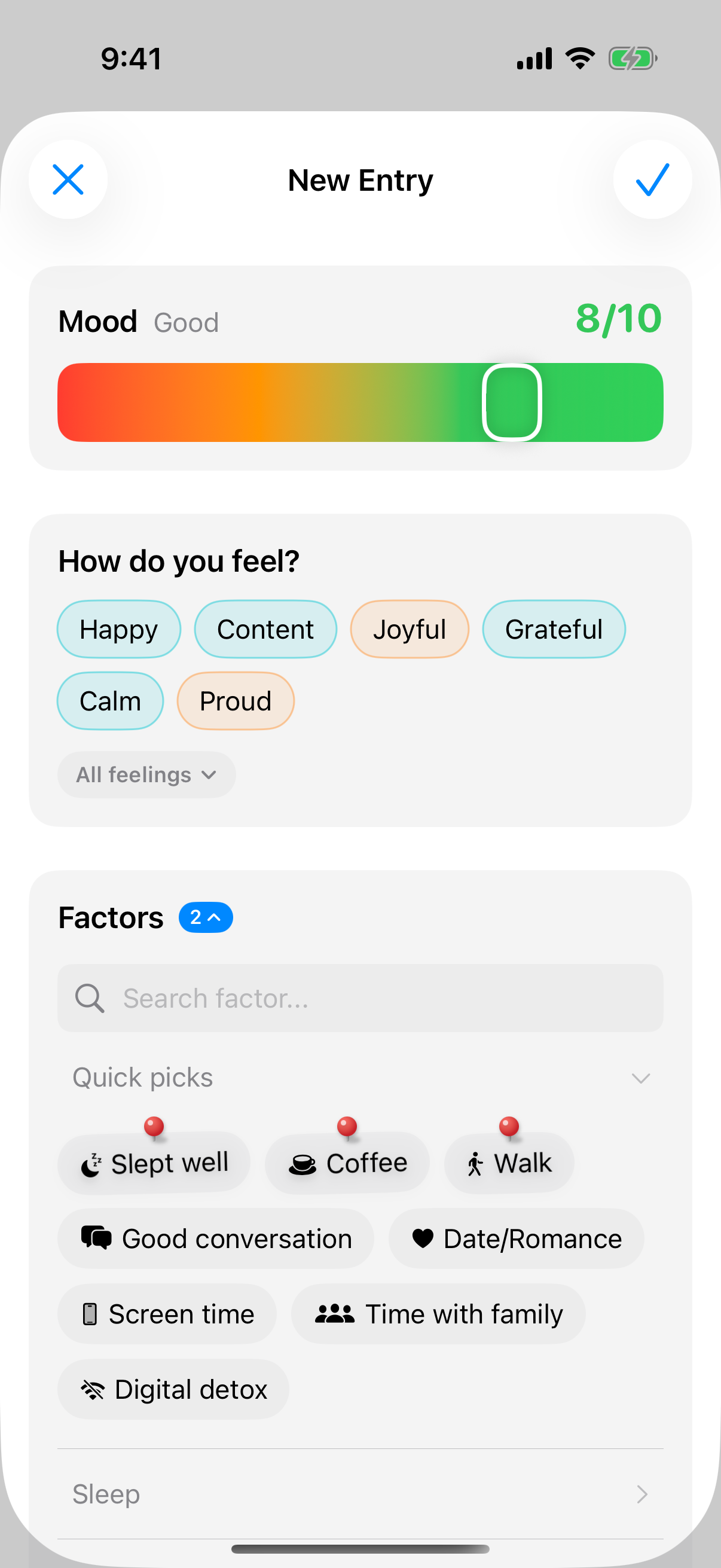
Tap the plus icon in the Journal tab. The editor has six sections: Mood, Feelings, Factors, Photos & Files, Notes and Date. They stay in this order until you rearrange them yourself (see the section Customize Entry below). Only the mood is required.
1. Pick your mood
Drag the color slider from red through orange and yellow to green. The slider snaps to whole steps from 1 to 10. A small emoji next to the value helps with orientation. The animation has a light spring effect and subtle haptic feedback, so setting it feels physically noticeable.
2. Name your feelings
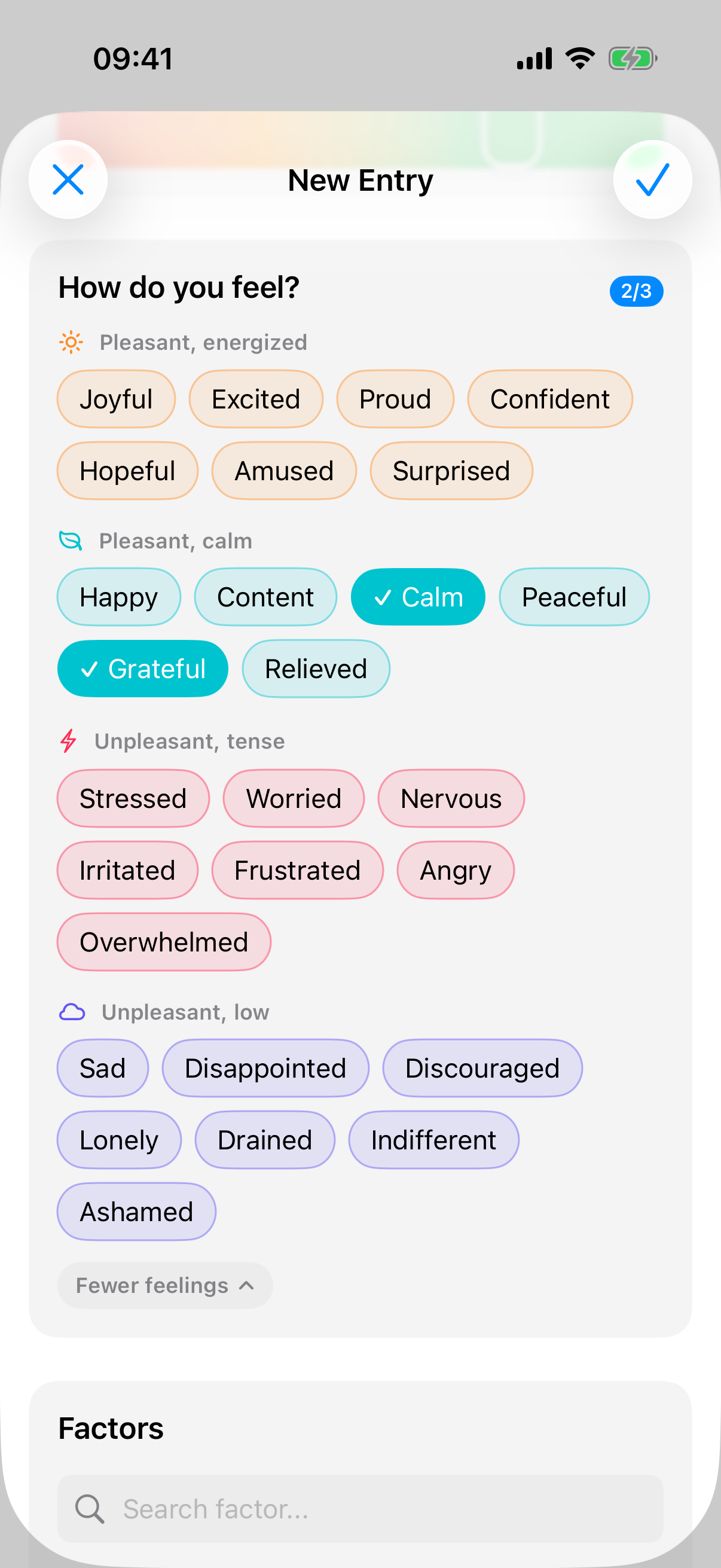
Below the mood, the section How do you feel? asks how the moment feels. The mood is the number, the feeling is the word for it. You pick up to three feelings per entry, entirely up to you.
First you see six suggestions that match your mood value: at 1 to 4, for example, Sad, Stressed or Drained; at 7 to 10, Happy, Content or Grateful. All feelings expands the full selection: 27 feelings in four groups, Pleasant, energized, Pleasant, calm, Unpleasant, tense and Unpleasant, low. The order within them stays fixed, so over time you find your feelings without looking.
Once you've picked three feelings, InnerPulse shows the rest paler. A second tap on a selected feeling deselects it.
The app deliberately keeps feelings and factors apart: the feeling describes how you are, the factor what shaped the day. That's why feelings don't feed into the factor analysis or any questionnaire score. They remain an observation. How often you name which feelings is shown in the Feelings analysis in the chapter Analysis & Patterns.
3. Set influence factors
Tap factors that shaped the day. At the top, Quick picks shows your pinned factors first, marked with a pin, followed by the app's suggestions. The suggestions match your weekday, your time of day and your recent entries. InnerPulse calculates them from six dimensions like frequency, recency and co-occurrence with other factors. How exactly that works and how to pin factors is explained in the chapter Factors.
You can tap Same as yesterday to take over all factors from the last entry. Handy on days when little has changed.
If you've connected Apple Health, InnerPulse sets clear matches like Enough sleep directly and marks them with a heart. Uncertain matches like Slept well appear above them under Suggested by Apple Health. Tap the plus to accept a suggestion, or the ✕ to dismiss it. More on this in the chapter Apple Health & Weather.
Intensity instead of just yes or no: For factors where you've enabled the intensity slider, a five-step slider from low to high appears instead of the simple selection. That way you tell apart a light walk from an intense workout, or a little from a lot of coffee. You enable the slider per factor, see chapter Factors. How the app later compares high and low intensity is in the chapter Analysis & Patterns.
4. Attach photos and files
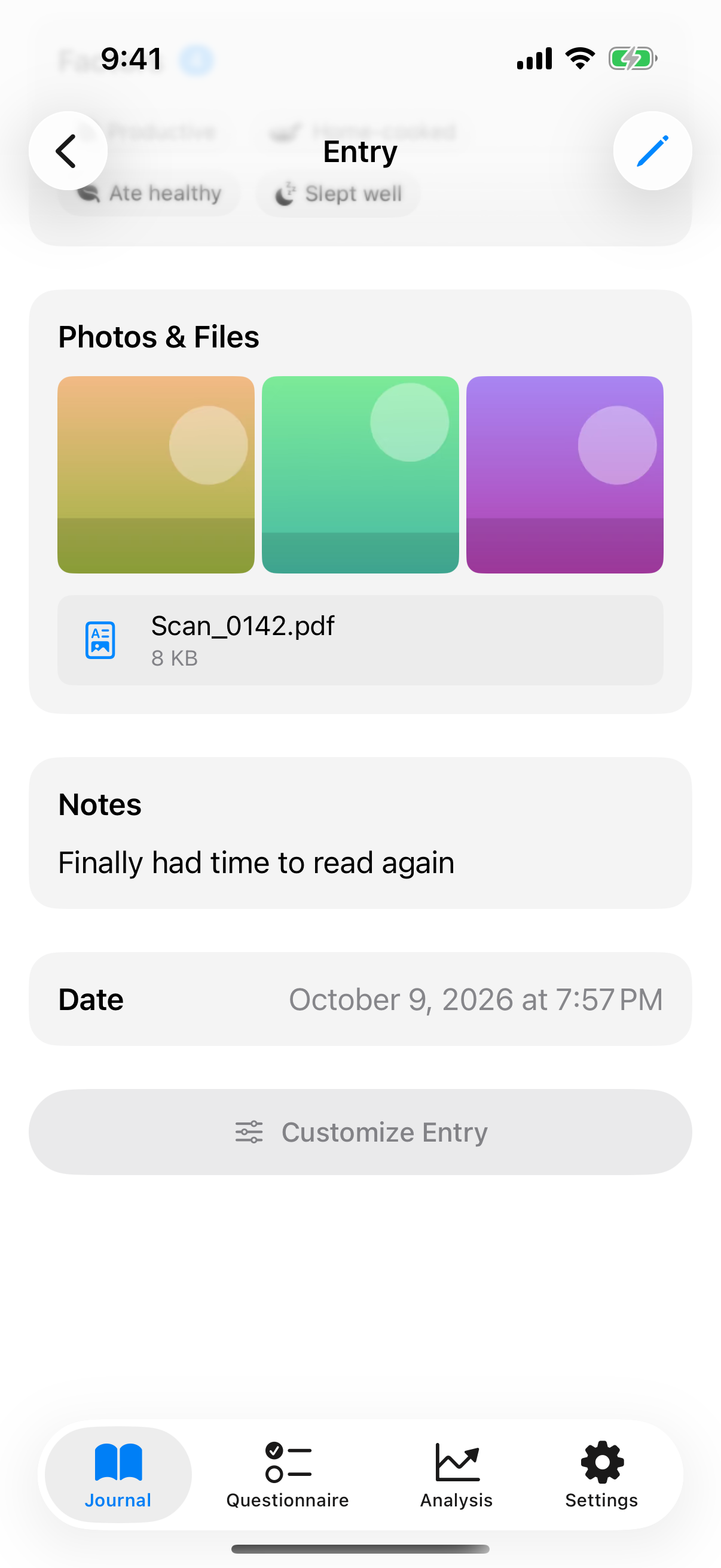
In the Photos & Files section, tap Add and choose a source:
- Photos: pictures from your library, several at once if you like.
- Camera: take a new photo.
- File: for example a PDF, a voice memo or a spreadsheet from the Files app.
- Paste: appears when your clipboard contains an image.
InnerPulse doesn't limit how many attachments an entry has. Pictures appear as a full-width grid, files as rows with name and size below it. A tap opens the full-screen view: you swipe through all attachments of the entry and read PDFs. While editing, press and hold a picture and choose Use as cover image. It then appears at the very top when you view the entry.
InnerPulse scales photos down to at most 2048 pixels on the long edge and removes location and camera data (EXIF) in the process. InnerPulse does not store videos, because photos are enough to capture a moment. If you pick a video via File, the app rejects it. It stores other files such as PDFs unchanged. All attachments live in the app's protected storage on your device. They don't go to Apple Health, to the Apple Watch or into widgets, and the app writes nothing to your photo library. How to include attachments in an export is explained in the chapter Export your data.
5. Write a note
Below the note field you'll see up to three writing prompts. They are short questions that match the chosen mood, e.g. "What weighed on you today?" at low values or "What felt easy today?" at high values. You don't have to answer any of them. They are an offer, not a requirement. Each prompt is held back for seven days after use, so the app doesn't keep asking you the same question.
Dictate instead of typing: In the note field you'll find a microphone button. Tap it to dictate. Speech recognition uses Apple Speech and runs on the device when your iPhone or iPad recognizes your language locally. If the local speech model isn't available, iOS may pass recognition on to Apple servers. The live transcript appears as you speak. When you stop, you choose whether the text replaces or is appended to your note. The first time, iOS asks for microphone and speech recognition permission.
6. Check the date
The app sets the current date. You can change it if you're recording a past day. If you hide the Date section, every new entry gets the current time.
Tap the checkmark at the top right. The editor closes right away, and Saved! briefly appears above the list.
What happens when you save
Behind the save tap, the app quietly works in the background:
- Factor statistics are updated (frequency, weekday affinity, co-occurrence with other factors).
- The reminder logic checks whether a pending notification still exists for today and cancels it.
- If you have Apple Health connected, InnerPulse writes the mood value to your Health app as State of Mind. Your chosen feelings appear there as the feelings of this mood entry. If you edit the entry later, InnerPulse replaces the entry in Apple Health instead of creating a second one. How that works exactly is in the chapter Apple Health & Weather.
Customize Entry
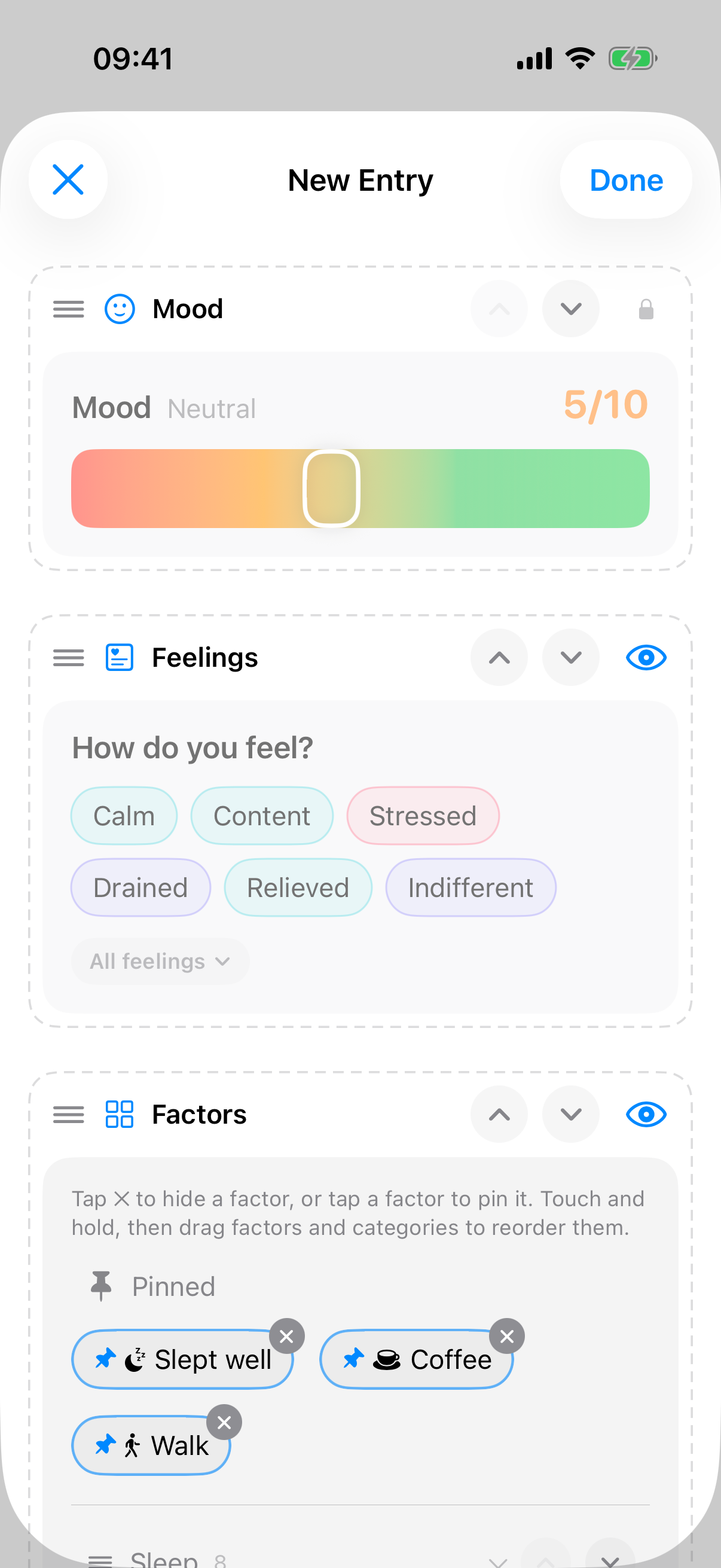
You decide how your entry is structured. Press and hold a section heading, or tap Customize Entry at the very bottom of the editor. Each section gets a dashed outline with a handle, arrows and an eye. Now you can:
- Reorder sections: hold the header and drag it onto another section, or use the arrows.
- Hide sections: tap the eye. The mood carries a lock instead, it always stays visible.
- Pin factors: tap a factor. Pinned factors always sit at the top of Quick picks in the entry.
- Hide factors: tap the ✕ on the factor. You bring it back under Hidden Factors.
- Reorder factors and categories: hold a factor or a category header and drag it to another spot. You reorder factors within their category.
Tap Done to leave the mode. Restore Default resets the order and visibility of the sections and the order of the categories. Pinned, hidden and reordered factors stay as they are.
A hidden section is missing from new entries. If an existing entry contains data there, such as a note, it doesn't disappear: InnerPulse lists the section at the end of the entry under Hidden, contains data, with a short preview and the Show button.
If you made a mistake, shake your iPhone within 30 seconds. InnerPulse undoes the last change, such as a hidden factor or a moved section.
The trend chart
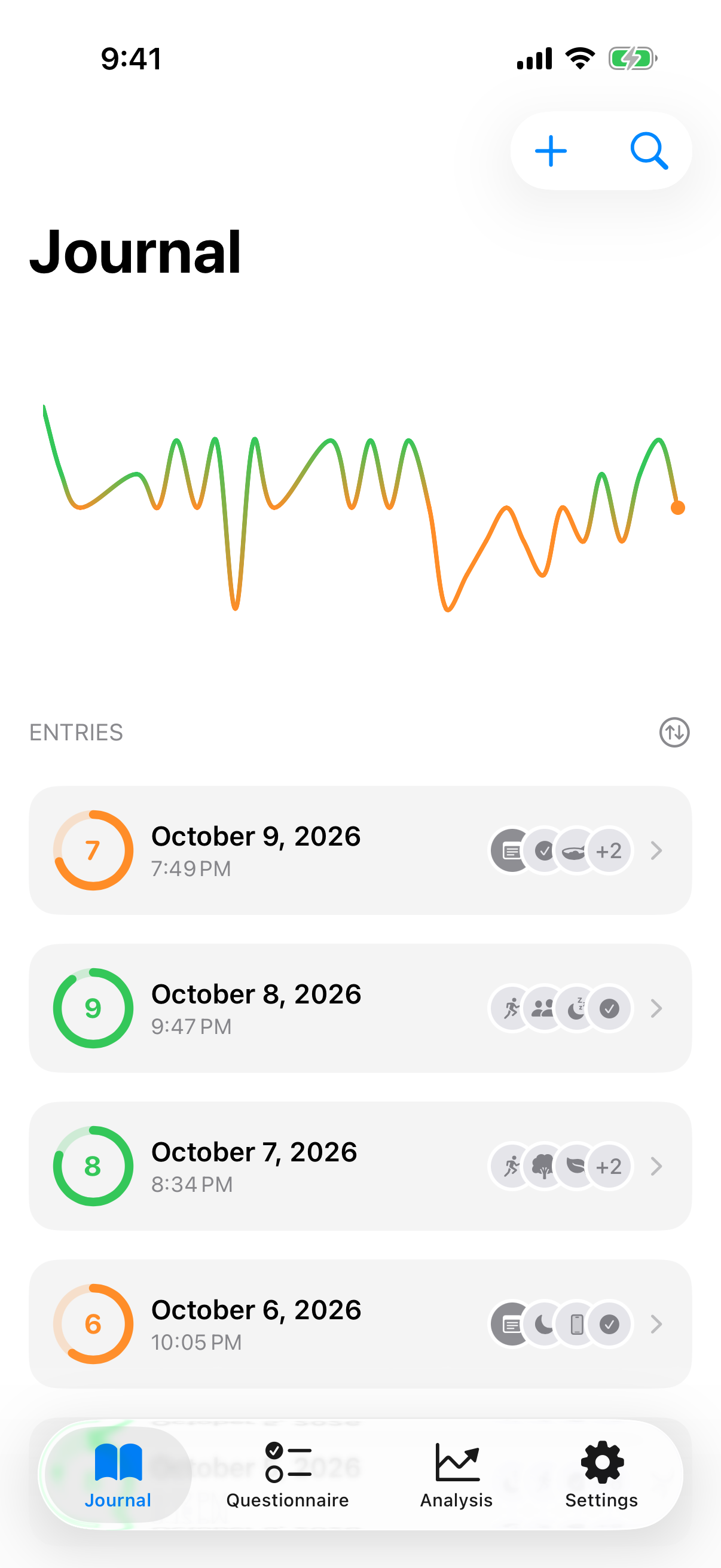
At the top of the journal list you'll see a chart of the last 30 entries. You can drag the white cursor across the chart to inspect individual days. In Settings you choose between three styles: Line, Bars or Colour.
Below that follows the chronological list of entries. Each row shows the mood ring, date and time, and a row of small icons: first a picture icon for photos, a document icon for files and a note icon, then the factors. Up to four icons fit in the row. If there are more, the row shows three of them and a counter like "+2". Which details appear in the title and subtitle lines, including your feelings, you set in Settings.
Search the journal
At the top right of the journal list, next to the plus, sits a magnifier icon. Tap it and a small search field opens. The list filters live as you type, and searches four things at once: your note text, the factor names, your feelings and the date. If you search for "Sports", all entries with that factor appear; if you search for a month, all entries from that period.
While you search, the trend chart at the top stays visible. The heading switches to "Entries (filtered)" and shows the hit count. If there are no hits, it reads "No matches". The search field closes when you tap next to it, but the filter stays active. The magnifier icon then becomes a filter icon. A tap on it clears the filter again.
View, edit or delete an entry
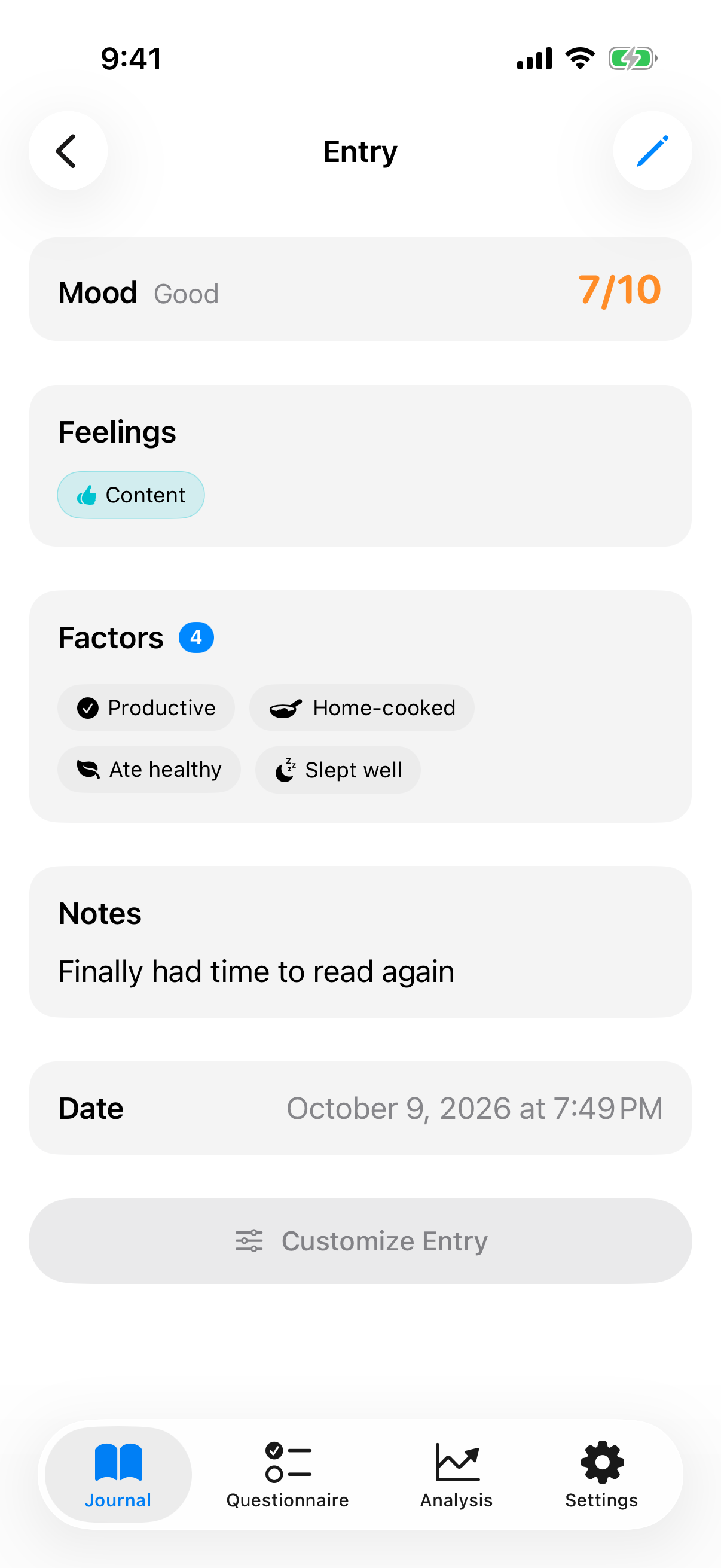
Tap an entry to open it. Use the pencil at the top right to edit it. Press and hold an entry to see a preview with note, feelings, factors and the first photo without opening it. This also works in a factor's entry list in the analysis. If the entry is long, the preview shortens it: the note ends with an ellipsis, and a pill such as +8 groups the remaining factors. Tap to see the whole entry. The menu below the preview offers Edit and Delete.
Swipe an entry left in the list to delete it. The red delete button follows your finger from the first movement. If you drag far enough, InnerPulse deletes the entry directly. If you delete by accident, shake the iPhone within 30 seconds and confirm Undo. The entry comes back with all factors, feelings, the note and its attachments.
Multiple entries on the same day
You can make as many entries per day as you want. Each entry is saved with date and time and distinguished by the time of day. So you can record how you feel in the morning, at noon and in the evening, if that makes sense to you.
The one thing to keep in mind: if you make multiple entries on one day with very different mood values, the chart can look jumpy at that point. For a smoother trend curve, one entry per day is often enough.
Catch up on missed days
If you like, InnerPulse shows you days on which you recorded nothing. To do that, enable the option Show unlogged days in Settings under "General". In the journal list the empty days then appear as a subtle, dashed tile with a plus symbol between your entries.
A tap on such a tile creates an entry for exactly that day, with the date already prefilled. That way you catch up on a forgotten day in seconds.
The feature is deliberately kept friendly: no streak display, no reproachful tone, no push reminder about missed days. It is an offer to catch up, not an accusation. When a search is active, the placeholders are hidden so your results list stays clean.
What to know
- You can fill in past days at any time. Set an earlier date and the entry will appear at the correct spot in the chart.
- Multiple entries per day are allowed and are distinguished by time of day.
- The search via the magnifier icon searches notes, factors, feelings and date at once and keeps the trend chart visible.
- Factor suggestions get better with each entry. After several entries, the app picks up on first weekday patterns.
- Voice dictation works offline when your device recognizes your language locally. Otherwise iOS passes recognition on to Apple.
- InnerPulse stores attachments on this device. Back them up with a device backup or the ZIP export, see Export your data. With Sync photos and files in device sync, photos and files up to 25 MB also go encrypted to your other devices.